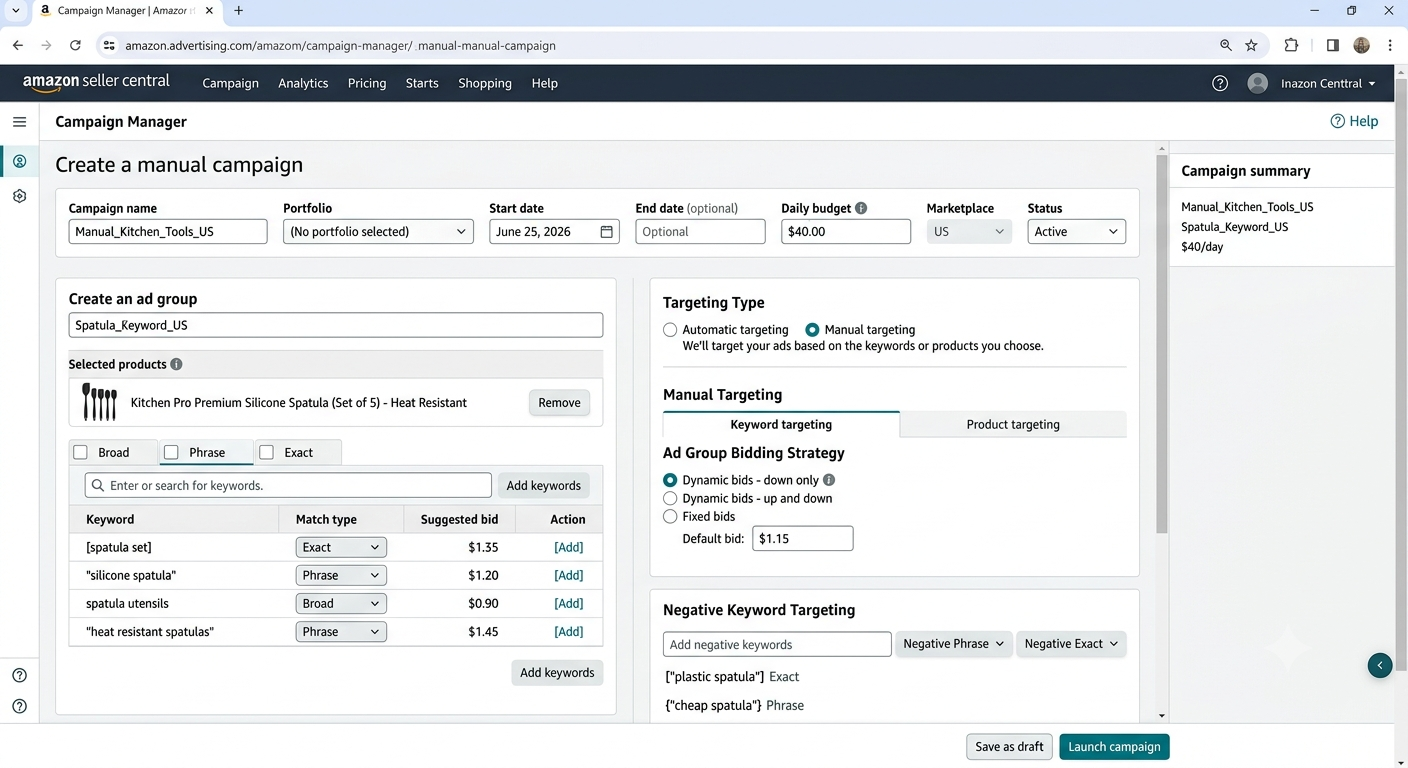
Automatic campaigns are where most sellers start, and they are fine for that. But manual campaigns are where the real control and profitability live. They let you choose exactly which keywords to target and how much to bid, instead of letting Amazon decide. This guide walks through setting up an Amazon PPC manual campaign step by step, including how to use your automatic campaigns to feed them.
Quick Answer
To set up an Amazon PPC manual campaign: gather proven keywords (often from your automatic campaign’s search term report), create a Sponsored Products manual campaign, group keywords by match type (exact, phrase, broad), set deliberate bids, and monitor performance to refine. Manual campaigns trade convenience for the control that drives profitability.
Key Takeaways
Manual campaigns give you control over keywords and bids.
Use automatic campaign data to find proven keywords.
Organize keywords by match type: exact, phrase, broad.
Set bids deliberately, then refine with data.
Control is what makes manual campaigns profitable.
An automatic campaign lets Amazon decide which searches to show your product for. That is convenient, but it means you are not in control of where your budget goes. A manual campaign flips that: you choose the exact keywords and the bid for each. This control is what lets you pour budget into the terms that convert and cut the ones that waste money. If you are new to all this, start with our guide on how Amazon PPC works and for the campaigns types, see our guide comparing Amazon Sponsored Products vs Sponsored Brands
Step 1: Harvest Proven Keywords
The best source of manual keywords is your own data. Run an automatic campaign first, then pull its search term report. It shows the exact searches that led to sales. Those proven converting terms are the ideal seeds for your manual campaign, because you already know they work for your product, rather than guessing.
TIP: Look for search terms in your automatic report that have several sales at a reasonable ACoS. These are your highest-confidence keywords to move into a manual campaign and bid on deliberately.
Step 2: Create the Manual Campaign
In Campaign Manager, create a new Sponsored Products campaign and choose manual targeting. Give it a clear name, set a daily budget you are comfortable with, and choose your bidding strategy. Starting with “dynamic bids, down only” is a common conservative choice while you gather data, since it lowers bids when a conversion looks unlikely.
amazon ppc manual campaign setup guide
Step 3: Choose Your Match Types
Manual keyword campaigns use three match types, and using them deliberately is key:
Match Type
Triggers On
Best For
Exact
That exact term only
Proven, high-value keywords
Phrase
The phrase plus extra words
Controlled expansion
Broad
Related variations
Discovering new terms
A common structure is to put your best proven keywords in exact match with higher bids, and use phrase or broad match to keep discovering new terms.
Step 4: Set Your Bids
Set bids based on the value of each keyword, not a single flat number. Your proven, high-converting exact-match terms can carry higher bids because you know they pay off. Discovery terms in broad match can start lower. Amazon’s suggested bid is a starting reference, not a rule, your own conversion data should guide you over time.
COMMON MISTAKE: Setting every keyword to the same bid and walking away. Different keywords have very different values to your business. Flat bidding overpays for weak terms and underbids on your best ones. Bid by value, then adjust with data.
Step 5: Monitor and Refine
A manual campaign is not set-and-forget. Check performance regularly: raise bids on keywords that convert well, lower or pause ones that waste spend, and add negative keywords to block irrelevant searches. This ongoing refinement is exactly where manual campaigns earn their advantage over automatic ones. For the bigger decision of doing this yourself versus hiring out, see our guide on PPC management vs DIY.
If managing manual campaigns across many products is more than you want to take on, that is what we do. Our Amazon PPC management service runs this process for you, and you can see the results on our client results page.
A manual campaign is one where you choose the exact keywords to target and set the bid for each, rather than letting Amazon decide as it does in automatic campaigns. This gives you control over where your budget goes.
Should I run automatic or manual campaigns?
Most sellers use both. Automatic campaigns are great for discovering converting keywords, which you then move into manual campaigns for tighter control over bids and budget. They work together.
How do I find keywords for a manual campaign?
The best source is your automatic campaign’s search term report, which shows the exact searches that led to sales. Those proven terms are ideal seeds because you already know they convert for your product.
What match types should I use?
Use exact match for proven high-value keywords with higher bids, and phrase or broad match to keep discovering new terms. A common structure combines all three deliberately rather than relying on one.
How often should I adjust a manual campaign?
Check performance regularly, often weekly. Raise bids on strong converters, lower or pause wasteful keywords, and add negatives to block irrelevant searches. This ongoing refinement is where manual campaigns earn their advantage.
Written by the AMZ Scaler Team
Amazon advertising and listing specialists with 5+ years managing PPC and listing optimization for brands across the US, UK, and Canada. We publish what we apply in real seller accounts every day.