Amazon is quietly changing how multi-unit selling works for FBA brands. Through its Virtual Multipacks pilot, Amazon automatically creates 2-pack and larger listings from your existing single-unit FBA inventory, no repacking, no new shipments, no prep. It can lift your average order value with zero operational work. But there are catches, including one decision you cannot undo. Here is how Amazon Virtual Multipacks work and what to check in your catalog now.
Quick Answer
Amazon Virtual Multipacks (VMPs) let shoppers buy multiple units of the same ASIN as a single offer, fulfilled from your existing single-pack FBA inventory. Amazon selects eligible brand-owned ASINs automatically, there is no opt-in, and creates the listings for you with a VMP_ SKU prefix. Default pricing is simply unit price times pack size, images are auto-generated, and deleting a VMP listing during the pilot is permanent. Check Manage All Inventory for the VMP_ prefix to see if you are in.
What Virtual Multipacks Are
A virtual multipack combines multiple units of the same ASIN into one offer. That is the key difference from virtual bundles, which combine different ASINs. Until now, selling a 2-pack of your own product meant physically bundling: new packaging, new labels, a new SKU, separate inventory, and extra prep fees. VMPs remove all of that. Amazon fulfills a 2-pack order by picking two units from your existing single-pack stock.
Each multipack gets its own ASIN and SKU with the VMP_ prefix, and it appears as a variation on your single-pack detail page, the same way a color or size option would. Amazon selects eligible ASINs through an automated process, focused on FBA brand-owned products with demonstrated multi-unit demand. You cannot apply, and support cannot enable it for you. If Amazon picks your ASIN, the listings simply appear in your catalog. The pilot began in late 2025 and has continued expanding through 2026, so new waves of auto-created listings keep appearing in seller accounts.
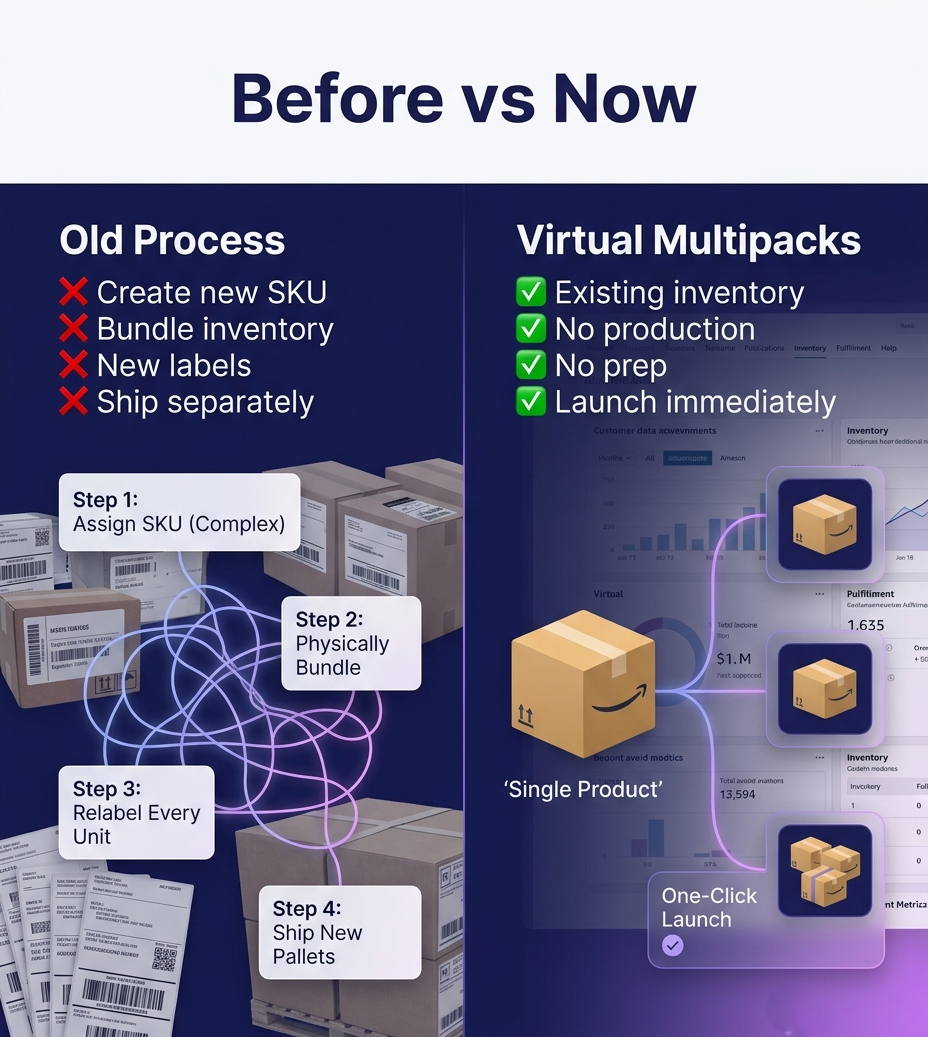
The old path to a multipack meant new SKUs, physical bundling, relabeling, and separate shipments. Virtual Multipacks create the offer from your existing single-pack inventory with no extra prep.
The Opportunity and the Catches
The upside is real: higher average order value from inventory you already hold, and a free way to test multipack demand before committing to physically bundled SKUs, which carry lower per-unit FBA fees if demand proves out. Early adopters also gain extra real estate on their own detail page.
Now the catches, and these matter:
Deleting a VMP listing during the pilot is irreversible. If you remove an auto-created multipack, it cannot be reactivated. Do not tidy your catalog by deleting VMP_ listings you might want later.
Fees are charged per unit, not per order. A 2-pack sale is charged two times the single-pack fulfillment fee. Unlike a physically bundled 2-pack, there is no fee efficiency, so if you discount the multipack price, the discount comes entirely out of your margin.
Pricing does not sync. The default price is unit price times pack size, and if you later change the single-pack price, the multipack does not update automatically. An unwatched VMP can end up overpriced or underpriced.
Images do not sync either. Amazon auto-generates multipack images from your single-pack photos, and they will not update when you update the original.
What to Check in Your Catalog Now
Filter Manage All Inventory for VMP_. That is how you find out whether Amazon has created multipacks for you. Some sellers first discover them as unknown ASINs and assume hijacking; check before you panic, and before you delete.
Review the auto-set price on every VMP. Make sure unit-times-quantity actually works for your margins once per-unit fulfillment fees are counted. Adjust deliberately if you want the multipack to offer any saving.
Review the auto-generated images and copy. You can edit title, price, images, and description, but not the pack size. Bring them up to your brand standard.
Add a sync step to your process. Whenever you change your single-pack price or main image, update the VMP manually. It will not follow on its own.
Run promotions on VMPs deliberately. Coupons and ads can target the multipack ASIN specifically, which is a clean way to push average order value on your best sellers.
IMPORTANT: If your single-pack ASIN runs out of stock, the multipack variation disappears from the detail page until you replenish. VMPs make inventory planning matter more, not less, because a stockout now takes down two offers at once. Note also that VMP sales do not appear in most standard Seller Central reports yet, so track them through the dedicated sales reports for virtual bundles and multipacks.
How do I know if my products have Virtual Multipacks?
Go to Manage All Inventory in Seller Central and filter for the VMP_ prefix. Virtual multipacks are labeled as such and appear as variations of your single-pack ASIN. If nothing appears, your ASINs have not been selected for the pilot yet.
Can I opt in to Virtual Multipacks?
No. Amazon selects eligible FBA brand-owned ASINs through an automated process based on multi-unit purchase demand. There is no application, and Seller Support cannot enable it manually. Maintaining strong listing health, steady sales, and reliable inventory improves your odds.
What happens if I delete a Virtual Multipack listing?
During the pilot, deletion is permanent. A deleted VMP cannot be reactivated. Review the listing’s price and images first, and only delete if the multipack genuinely conflicts with your pricing or brand strategy.
Do Virtual Multipacks cost extra?
There are no program fees, but fulfillment fees are charged per unit. A 2-pack order costs two times the single-pack fulfillment fee, so there is no fee saving compared to selling two units separately. Physically bundled multipacks remain the cheaper option per unit if demand justifies the operational work.
Written by the AMZ Scaler Team
Amazon advertising and listing specialists with 5+ years managing PPC and listing optimization for brands across the US, UK, and Canada. We publish what we apply in real seller accounts every day.