Amazon is moving some ASINs into new fee categories on October 31, 2026. Your product does not change and your listing does not change, but the fee you pay on every sale can. Because a fee category drives your referral fee and several FBA fees, a product with a thin margin can quietly slip into a loss, and most sellers only notice when the monthly numbers arrive. Here is what the Amazon fee category change means, how to check your ASINs, and how to dispute a wrong category before it costs you.
Quick Answer
Amazon is notifying sellers that some ASINs will move to different fee categories effective October 31, 2026 (beBOLD Digital, Nova). Every ASIN belongs to one fee category, and that category sets your referral fee and can also affect closing fees, FBA fulfillment fees, and returns processing fees. Check the Fee Preview report in Seller Central for upcoming category changes, recalculate your margin and break-even ACoS for each affected ASIN, and dispute any wrong category through Selling Partner Support.
What Changed
Amazon assigns every ASIN to one fee category, even when the product appears in several places in the store. That category, not the browse node shoppers see, decides which rate you pay (Amazon: Understanding fee categories). Amazon is now reassigning some ASINs to different fee categories, effective October 31, 2026, and is notifying affected sellers.
- Effective date: October 31, 2026.
- Who is affected: sellers with ASINs Amazon has reassigned. Amazon is sending notices, and both FBA and FBM sellers pay referral fees, so both can be affected.
- Fees that can change: referral fees first, plus closing fees, FBA fulfillment fees, and FBA returns processing fees, which also depend on category.
- Where to check: the Fee Preview report shows each ASIN’s current fee category and any upcoming change.
- If it is wrong: Amazon has a dispute process through Selling Partner Support.
What It Means for Your Margins
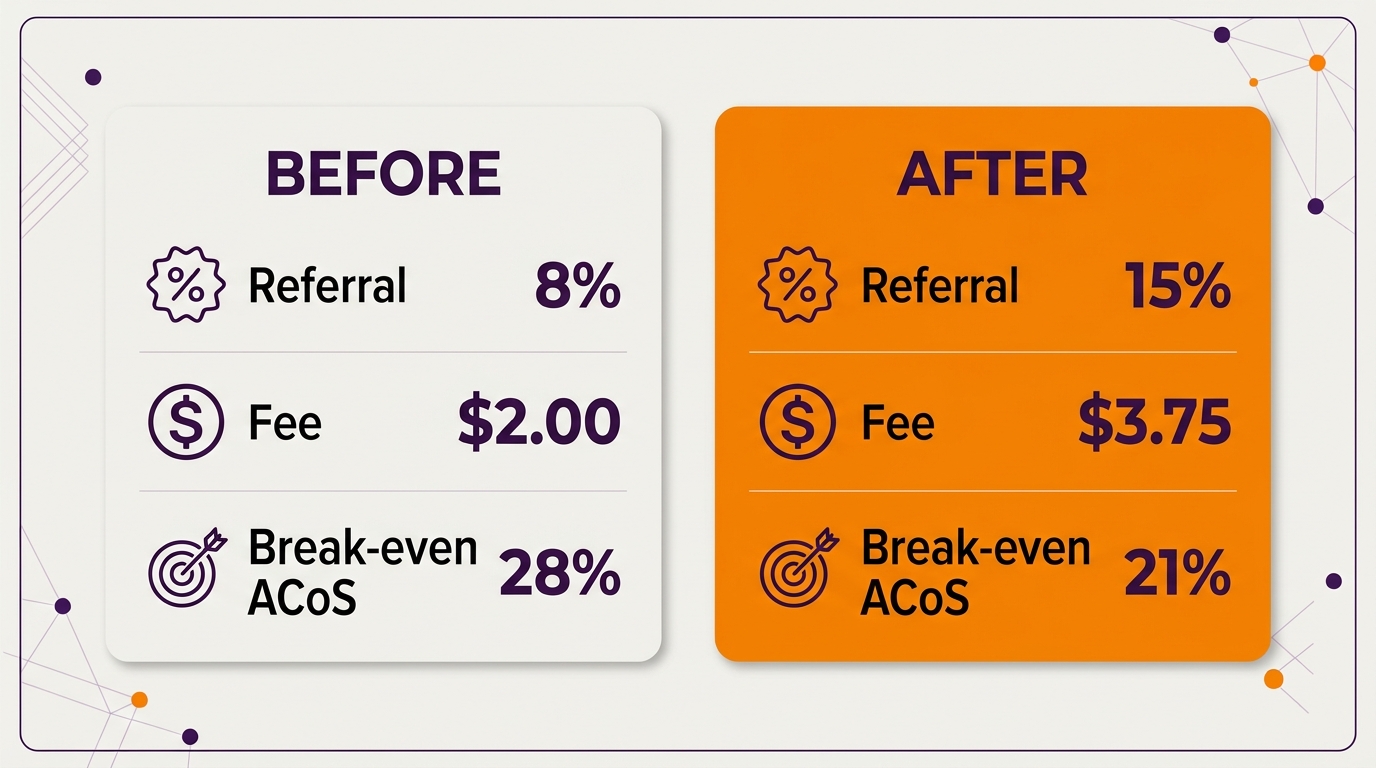
A category move can change the referral rate on every unit. Here is an illustrative example for a $25 product. The rates are examples only; check the current Amazon fee schedule for your category.
| Before | After | |
|---|---|---|
| Selling price | $25.00 | $25.00 |
| Referral rate (example) | 8% | 15% |
| Referral fee | $2.00 | $3.75 |
| Profit before ads | $7.00 | $5.25 |
| Break-even ACoS | 28% | 21% |
Nothing about the product changed, yet break-even ACoS dropped by 7 points. Any campaign running between 21% and 28% ACoS was profitable on October 30 and loses money on October 31. That is why this is a PPC problem as much as a fee problem. Our unit economics guide explains profit before ads, and our break-even CPC guide turns it into a maximum bid.
What to Do Before October 31
- Pull the Fee Preview report. Filter for ASINs with an upcoming fee category change.
- Compare old and new fees. For each affected ASIN, note the referral rate and any FBA fee change.
- Recalculate margin and break-even ACoS. Use our free ACoS calculator with the new fee.
- Adjust bids on affected ASINs. Lower target ACoS where break-even fell, before the new fees start charging.
- Dispute wrong categories. Send Selling Partner Support the ASIN, the current and new categories, the product attributes, and the line in Amazon’s fee category guidelines that supports your case. Keep copies.
- Revisit pricing for thin-margin SKUs. Peak fees already apply this quarter, so stack both changes when you decide. Our Q4 peak fee guide has those numbers.
Related Reading
Frequently Asked Questions
What is an Amazon fee category?
It is the category Amazon uses to set fees for an ASIN. Every ASIN has one fee category, even if it appears in several store categories, and it determines your referral fee and can affect closing, FBA fulfillment, and returns processing fees.
How do I know if my ASINs are affected by the October 31 change?
Amazon is notifying affected sellers, and the Fee Preview report in Seller Central shows each ASIN’s current fee category and any upcoming change. Check it in every marketplace you sell in.
Can I dispute a new fee category?
Yes. Contact Selling Partner Support with the ASIN, the current and new categories, the relevant product attributes, and the Amazon fee category guideline that supports your classification.
See our Amazon PPC management service and our client results.
Sources: Amazon Seller Central, Understanding fee categories; beBOLD Digital, ASIN fee category reassignment; Nova, fee category changes on October 31.
Written by the AMZ Scaler Team
Amazon advertising and listing specialists with 5+ years managing PPC and listing optimization for brands across the US, UK, and Canada. We publish what we apply in real seller accounts every day.