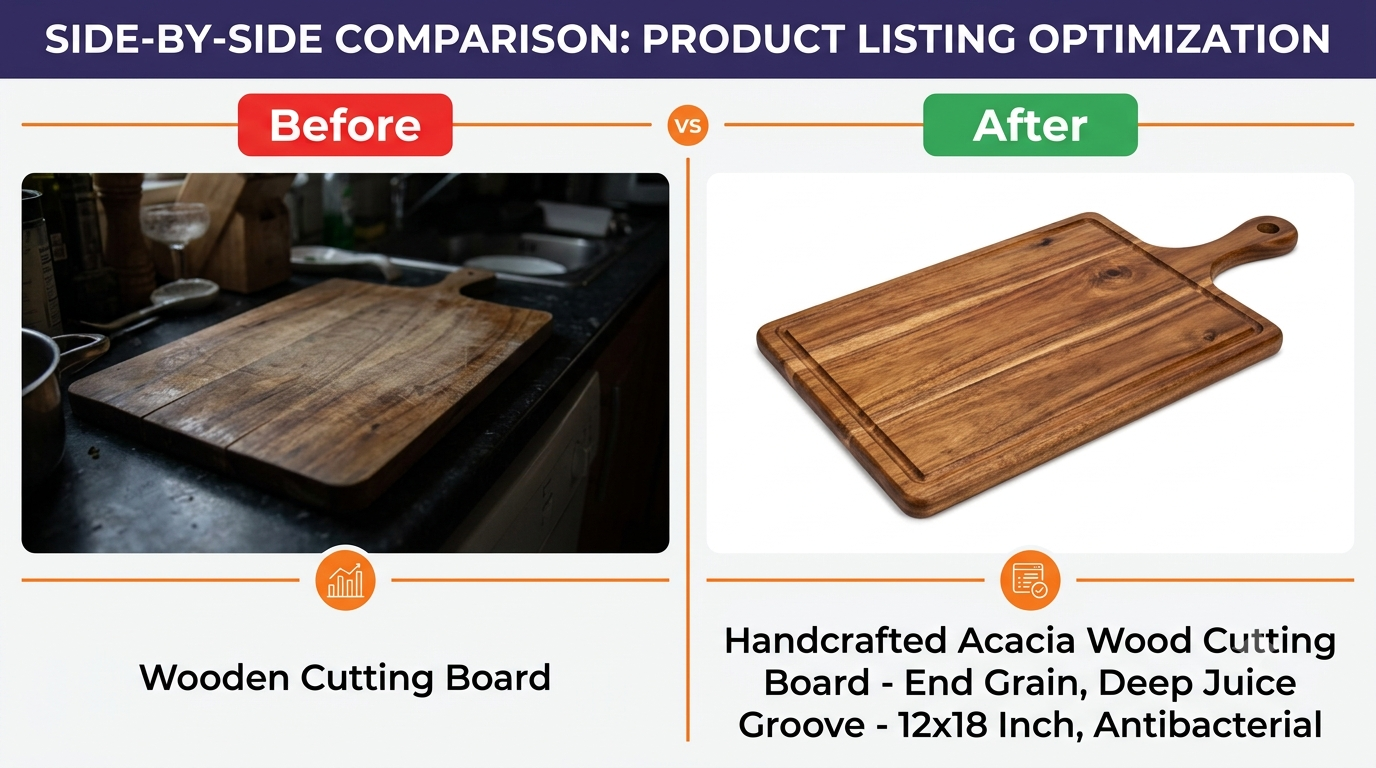
It’s one thing to read tips about listing optimization, another to see what actually changes. This post walks through realistic before-and-after examples of Amazon listing optimization, showing exactly how a weak title, bullet, or image becomes a strong one and why each change matters. Use these as templates for your own listings.
Quick Answer
Amazon listing optimization examples show the shift from vague, feature-listing copy to keyword-led, benefit-first copy. A weak title like “Wooden Board” becomes “Bamboo Cutting Board Set, Extra Large Wood Chopping Board with Handle for Kitchen, Meat and Charcuterie.” The optimized version ranks for more searches and tells shoppers why to buy.
Key Takeaways
Optimized titles lead with keywords and add key attributes.
Strong bullets lead with the benefit, then the feature.
Good images show use, scale, and what’s included.
Every change serves either ranking, conversion, or both.
Before: “Wooden Cutting Board”
After: “Bamboo Cutting Board Set, Extra Large Wood Chopping Board with Handle for Kitchen, Meat and Charcuterie”
The before version is indexed for almost nothing and tells the shopper nothing. The after version leads with the primary keyword, adds high-value secondary terms (“chopping board,” “charcuterie”), and signals key attributes (extra large, with handle, set). It ranks for far more searches and answers the shopper’s questions before they click.
A weak title (top) versus an optimized title (bottom): more keywords indexed, more reasons to click.
Bullet Point: Before and After
Before: “Made from 100% bamboo. Measures 18 x 12 inches. Has a handle.”
After: “BUILT TO LAST A LIFETIME: Dense, knife-friendly bamboo resists deep cuts and warping far better than cheap wood, so your board still looks new after years of daily chopping. The extra-large 18 x 12 inch surface and built-in handle make prep and serving effortless.”
The before bullet is a spec sheet. The after bullet leads with the benefit (a board that lasts), keeps the specs but frames them around what the shopper gains, and answers a real objection (cheap boards crack and warp).
TIP: Notice the after bullet opens with a short capitalized hook (“BUILT TO LAST A LIFETIME”). Shoppers scan bullets, and a benefit-led hook earns the read before the detail does the convincing.
Images: Before and After
Before: A single dim photo of the board on a kitchen counter, edges cropped.
After: A bright main image of the board on pure white filling the frame, plus gallery images showing it in use with food, a size comparison next to common kitchen items, a close-up of the grain and handle, and a shot of the full set together.
The before image barely earns a click. The after set wins the click with a clean main image and then closes the sale by answering size and use questions visually, which is what gallery images are for.
Backend Keywords: Before and After
Before: Empty, or “wooden, board, cutting” (repeating the title).
After: “butcher block charcuterie serving platter chopping kitchen meat cheese bread housewarming gift eco friendly”
The before wastes the field or repeats words already indexed in the title. The after adds entirely new relevant terms, including use cases (“charcuterie,” “serving platter”) and gift angles (“housewarming gift”), expanding the searches the listing can appear for at zero cost.
IMPORTANT: These examples are illustrative templates, not a promise of specific results. Real outcomes depend on your competition, pricing, reviews, and inventory. The principles hold across products; the numbers vary by market.
Why These Changes Work
Every change above serves one of two goals, and usually both. The title and backend changes expand indexing, so the listing is eligible to appear for more searches. The bullet and image changes lift conversion, so more of the shoppers who arrive actually buy. Because Amazon ranks listings that convert, better conversion then feeds back into better ranking. That is the whole engine of listing optimization in one loop.
If you’d like this kind of before-and-after done on your own listings, that’s exactly what we do. Our Amazon listing optimization service rewrites and restructures listings for ranking and conversion, and you can see real client outcomes on our client results page.
An optimized listing has a keyword-led, readable title, a clean main image with a strong gallery, five benefit-first bullets, a description or A+ content that answers questions, and full backend keywords. Each element works for both ranking and conversion.
How much can optimization improve a listing?
It varies widely by product and starting point. Listings with weak copy and poor images often see the biggest gains because there’s so much room to improve, but results depend on competition, pricing, reviews, and inventory.
Should I rewrite my whole listing or just parts?
Start with the highest-impact elements, the main image and title, then bullets and backend keywords. A full rewrite isn’t always needed; sometimes a stronger main image and first bullet move the needle most.
Can I use these examples as templates?
Yes. The structure shown, keyword-led titles, benefit-first bullets, and use-case backend terms, applies across most products. Adapt the specifics to your product and verify every claim is accurate.
How do I measure if my optimization worked?
Track your conversion rate and keyword ranking in the weeks after the change. A higher conversion rate and improved ranking for target terms are the signals. Ranking changes lag conversion improvements by a few weeks.
Written by the AMZ Scaler Team
Amazon advertising and listing specialists with 5+ years managing PPC and listing optimization for brands across the US, UK, and Canada. We publish what we apply in real seller accounts every day.