
Shoppers decide whether to click your listing in about a second, and that decision is driven almost entirely by your images. Your main image wins or loses the click; your gallery closes the sale. Yet images are where many sellers put the least effort. This guide covers how to optimize your Amazon product images, what each slot should do, and the technical rules that keep you compliant.
Quick Answer
To optimize Amazon product images, use a clean main image on a pure white background with the product filling the frame, then build a gallery that shows the product in use, demonstrates scale, calls out key features, and shows what is in the box. Use all available image slots, keep resolution high enough to zoom, and follow Amazon’s main-image rules to avoid suppression.
Key Takeaways
- The main image wins the click; the gallery closes the sale.
- Main image must be on pure white, product filling the frame.
- Show use, scale, features, and what’s in the box.
- Use every image slot and keep resolution zoom-ready.
- Breaking main-image rules risks suppression.
Table of Contents
- Why Images Drive Sales
- The Main Image
- What Each Gallery Slot Should Do
- Technical Requirements
- Image Mistakes to Avoid
- FAQs
Why Images Drive Sales More Than Copy
On a results page crowded with similar products, the image is what makes a shopper stop and click. Most never read your bullets until the image has already earned their attention. Then, once on your page, shoppers scroll the gallery far more than they read text. This is why images are the highest-leverage visual element in all of listing optimization: they control both the click and a large part of the conversion.
The Main Image: Win the Click
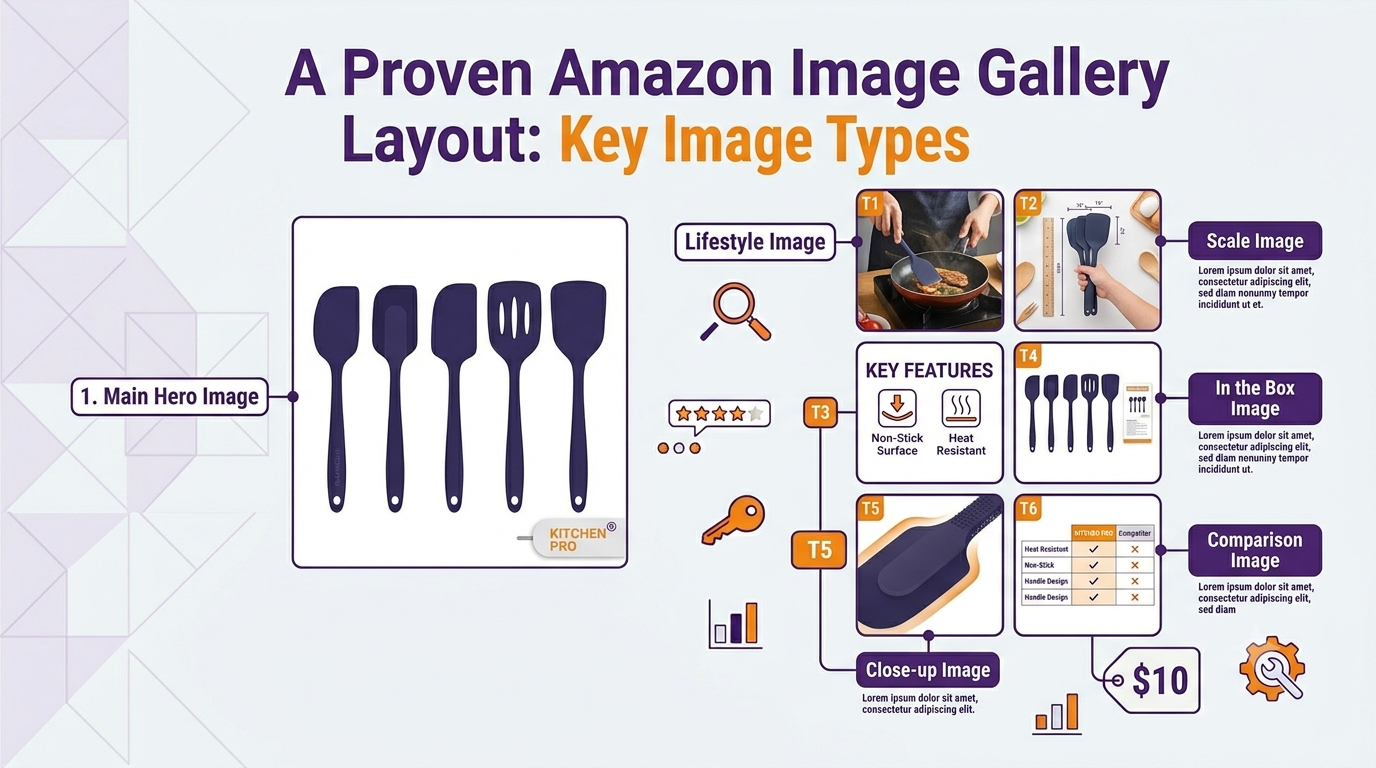
Your main image has one job: earn the click. Amazon requires it to be the product on a pure white background, and the best ones fill most of the frame, are bright and sharp, and are high enough resolution to zoom. No text, logos, badges, or props are allowed in the main image. Within those rules, your goal is to make the product look as appealing and clear as possible at thumbnail size.
What Each Gallery Slot Should Do
Your gallery images each have a job. A strong set covers:
- Lifestyle / in use so shoppers picture themselves using it.
- Scale reference next to a hand or common object, since size confusion drives returns.
- Feature callouts with short text overlays highlighting key benefits.
- What’s in the box so expectations are clear before purchase.
- Close-up detail of materials, texture, or craftsmanship.
- Comparison or sizing chart where relevant.
Technical Requirements
| Requirement | Guideline |
|---|---|
| Main image background | Pure white (RGB 255,255,255) |
| Longest side | At least 1600 px to enable zoom |
| Product fill | 85% or more of the frame |
| Format | JPEG preferred, sRGB color |
| Main image extras | No text, logos, or props |
Image Mistakes to Avoid
- A dim or cluttered main image that fails to win the click.
- Text or badges on the main image, which violates Amazon’s rules.
- Low resolution that disables zoom and looks unprofessional.
- No scale reference, leaving shoppers guessing about size.
If you want a full image set planned and your whole listing optimized for clicks and conversion, that is what we do. Our Amazon listing optimization service covers images alongside copy and SEO, and you can see the results on our client results page.
Related Reading
Frequently Asked Questions
How many images should an Amazon listing have?
Use every slot Amazon gives you, typically up to seven plus a video where eligible. Each image should do a specific job: main shot, lifestyle, scale, features, what’s in the box, and close-up detail.
What are the rules for the main image?
It must show the product on a pure white background, filling most of the frame, with no text, logos, badges, or props. The longest side should be at least 1600 pixels so shoppers can zoom.
Can I add text to my product images?
Not on the main image, which must be clean. On gallery images you can and should add short text overlays to call out key features and benefits.
Do images affect Amazon ranking?
Indirectly but significantly. Better images lift click-through and conversion, and because Amazon rewards listings that convert, stronger images support higher ranking over time.
Should I use lifestyle or white-background images?
Both. The main image must be on white, but your gallery should include lifestyle images that show the product in use, which help shoppers picture owning it and increase conversion.
Written by the AMZ Scaler Team
Amazon advertising and listing specialists with 5+ years managing PPC and listing optimization for brands across the US, UK, and Canada. We publish what we apply in real seller accounts every day.