
Amazon FBA partial refunds just got a lot more useful. Until now, if you enrolled a product, every eligible return reason could trigger a partial refund. Now you can choose which return reasons qualify and set a different refund percentage for each. That means you can let a customer keep an item they ordered by mistake for a partial refund, while still getting defective units back to find out what went wrong. Here is how FBA partial refunds by return reason work and how to set them up without hiding a product problem.
Quick Answer
FBA partial refunds let eligible customers keep an item and receive part of the price back instead of returning it. Amazon now lets sellers choose which return reasons qualify, either across all ASINs with up to three configurations, or for selected products through an Excel upload (Amazon Seller Forums announcement). It is available to FBA sellers in the US, UK, Germany, France, Italy, Spain, and Canada. Sellers already enrolled keep every eligible reason active until they change their settings.
What Changed
FBA partial refunds already existed. Amazon described them as a way to offer partial refunds without requiring a physical return, with those returns marked “Complete, return not expected” in the FBA Returns dashboard (original announcement). The new update adds control over return reasons:
- All ASINs: set different partial refund percentages by return reason, with up to three configurations.
- Selected ASINs: upload an Excel file listing the products, return reasons, and percentages that should qualify. Anything not listed follows the standard return process.
- Existing enrollments: if you are already enrolled, all eligible return reasons stay active until you change them.
- Marketplaces: US, UK, Germany, France, Italy, Spain, and Canada.
- Customer eligibility: Amazon decides which customers can get a partial refund, based on their profile and purchase history. Everyone else returns the item normally.
To find the settings, go to your FBA settings, open FBA returns evaluations and ownership settings, and edit Partial Refunds. In the new Seller Central layout, search “partial refunds” if the menu path looks different.
What It Means for Your Margins
A partial refund saves the return shipping, processing, and the risk of an unsellable unit coming back. Here is an illustrative comparison for a $24 product. The numbers are examples only.
| Full return | 30% partial refund | |
|---|---|---|
| Refund to customer | $24.00 | $7.20 |
| Unit comes back sellable? | Often not, after opening | Customer keeps it |
| Return handling and processing | Yes | None |
| Return data you collect | The physical unit to inspect | Return reason only |
For low-priced items that rarely come back in sellable condition, a partial refund is usually cheaper. The trade-off is information. When units do not come back, you cannot inspect them, so you lose the evidence that tells you whether a product has a defect. That is why the choice of return reasons matters more than the percentage. Build return costs into your unit economics so you are choosing with real numbers.
How to Set It Up
- Pull your return reasons by ASIN. Look at the last 90 days and group the reasons that come up most for each product.
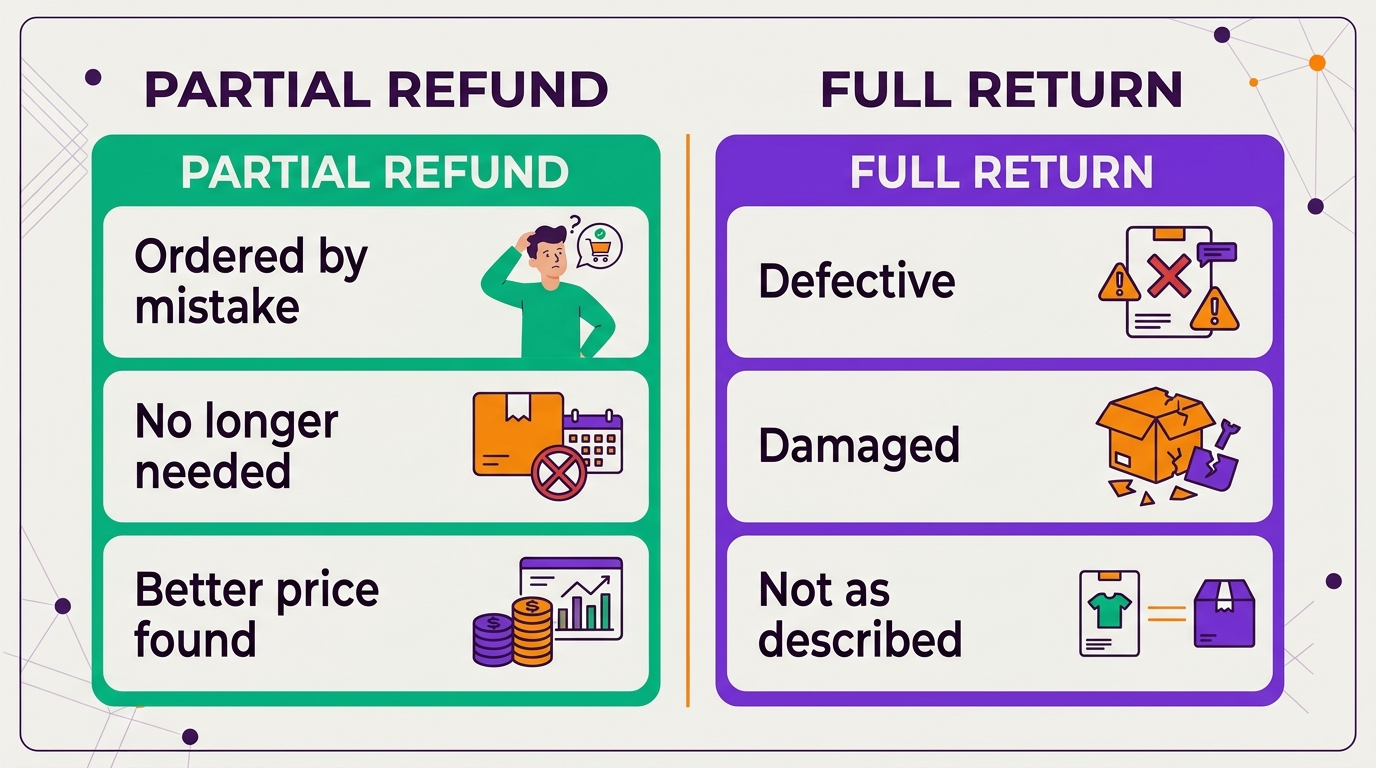
- Offer partial refunds on preference reasons. Reasons like ordered by mistake or no longer needed rarely point to a product problem, so a partial refund there is usually safe.
- Keep full returns on quality reasons. If customers say the item is defective, damaged, or not as described, you want those units back and the pattern visible.
- Use the Excel upload for your top sellers. High-volume ASINs deserve their own settings rather than one account-wide rule.
- Recheck monthly. If a reason grows after you turn on partial refunds, it may be getting used to keep items cheaply.
Related Reading
Frequently Asked Questions
What is an Amazon FBA partial refund?
It lets an eligible customer keep an FBA item and receive part of the purchase price back instead of returning it. Amazon marks these as complete with no return expected.
Can I choose which return reasons get a partial refund?
Yes. You can set percentages by return reason for all ASINs, with up to three configurations, or upload an Excel file for selected products. Reasons and products you leave out follow the standard return process.
Which marketplaces have FBA partial refunds by return reason?
The US, UK, Germany, France, Italy, Spain, and Canada, for FBA sellers.
See our client results.
Sources: Amazon Seller Forums, Return reasons now available for FBA Partial Refunds; Amazon Seller Forums, Manage FBA returns with partial refunds.
Written by the AMZ Scaler Team
Amazon advertising and listing specialists with 5+ years managing PPC and listing optimization for brands across the US, UK, and Canada. We publish what we apply in real seller accounts every day.
More in Amazon News & Trends
- How to Connect Claude to Amazon Ads With the Amazon Ads MCP Server →
- Amazon FBA Fee Changes 2027: What Rises on January 15 and How to Reset Your Bids →
- Amazon Holiday Return Policy 2026: Returns Until January 31, Now Every Year →
- Amazon Liability Insurance Requirement: $1M Cover Now Needed in Safety Categories at Any Sales Level →