
Quick Answer
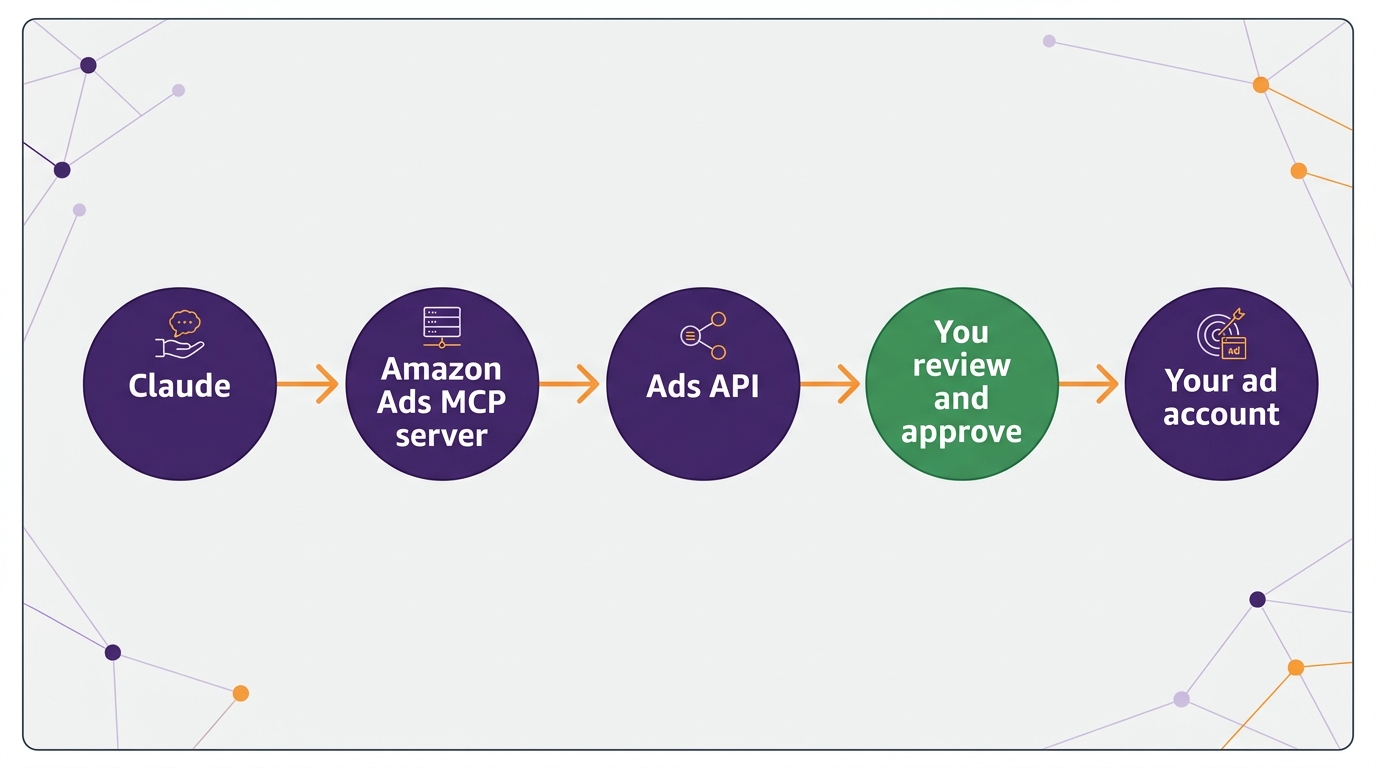
The Amazon Ads MCP server is Amazon’s official connection between AI assistants and the Amazon Ads API. Amazon announced it in open beta on February 2, 2026, for those with active Ads API credentials (Amazon Ads), which direct advertisers can apply for as well as agencies and partners. Once connected, Claude can list your accounts, run performance reports, and create, update, or delete campaigns. You need an approved Amazon Ads API application and a Login with Amazon app, then you add Amazon’s regional MCP address to Claude as a custom connector.
What the Amazon Ads MCP Server Does
MCP (Model Context Protocol) is a standard way for AI assistants to use outside tools. Amazon’s version exposes the Ads API as tools an assistant can call. According to Amazon, it supports:- Creating, updating, and deleting campaigns.
- Running performance and reporting queries.
- Managing account-level settings and reading billing data.
- Pre-built tools for multi-step jobs, such as building a Sponsored Products campaign that only needs your review and approval before launch, or expanding into new marketplaces.
Ads MCP vs the Seller Assistant Plugin
These are easy to confuse because both connect Claude to Amazon:| Amazon Ads MCP server | Seller Assistant plugin | |
|---|---|---|
| Data it reaches | Amazon Ads: campaigns, bids, budgets, reports, billing | Seller Central: orders, inventory, pricing, account health |
| Can it make changes? | Yes, including bids, budgets, and campaigns | Drafts actions; executes with your approval |
| Access | Approved Ads API application | Seller Central account (US beta) |
| Best for | PPC analysis and campaign work | Operations and catalog questions |
How to Connect Claude to Amazon Ads
Amazon’s MCP documentation has the full setup. In short:- Get Ads API access. Create an Amazon Developer account and a Login with Amazon app, then apply for Amazon Ads API access. Direct advertisers can apply, not only agencies.
- Link your app. After approval, assign Ads API access to your Login with Amazon app and keep its client ID.
- Add the connector in Claude. Add Amazon’s MCP server as a custom connector using the address for your region. North America uses advertising-ai.amazon.com/mcp, with separate addresses for Europe and the Far East.
- Sign in. Authorize with your Amazon Ads login. A setup with a client secret keeps you signed in; a public client needs you to sign in again when the token expires.
- Start read-only. Ask “Show me my advertising accounts” and a few reporting questions before trying anything that changes the account.
Questions Worth Asking First
- “Which search terms spent money in the last 30 days with zero orders?” This is the fastest wasted-spend check there is, and it pairs with our PPC audit checklist.
- “Which campaigns hit their budget before the end of the day last week, and what was their ACoS?”
- “What share of total spend went to the top 10 search terms?” This tells you where a change actually moves the account.
- “Compare top of search and product page placement ACoS for my Sponsored Products campaigns.”
When NOT to Use It
If you run a handful of campaigns and check them weekly, the Ads console and our unified Campaign Manager guide are enough. The MCP server pays off when you manage large accounts, several marketplaces, or many clients, and when you want answers that would otherwise take a report download and a spreadsheet. And never connect it to an account you cannot afford to have changed by mistake without setting permissions first.Related Reading
Frequently Asked Questions
What is the Amazon Ads MCP server?
It is Amazon’s official connection that lets AI assistants such as Claude, ChatGPT, or Gemini use the Amazon Ads API through plain-language requests. It has been in open beta since February 2, 2026.Do I need Amazon Ads API access to use it?
Yes. You need an approved Amazon Ads API application and a Login with Amazon app. Direct advertisers can apply as well as agencies and partners.Can Claude change my Amazon ad campaigns through MCP?
Yes. The server includes tools to create, update, and delete campaigns and to change bids and budgets. Start with read-only questions, review every proposed change, and disable delete tools until you trust the setup.Can I query Amazon Marketing Cloud with Claude?
Amazon’s MCP tool list includes AMC tools, including an AMC SQL generator that turns questions into queries. That tool is in a separate closed beta, so availability depends on your account.Written by the AMZ Scaler Team
Amazon advertising and listing specialists with 5+ years managing PPC and listing optimization for brands across the US, UK, and Canada. We publish what we apply in real seller accounts every day.
More in Amazon News & Trends
- Amazon FBA Fee Changes 2027: What Rises on January 15 and How to Reset Your Bids →
- Amazon Holiday Return Policy 2026: Returns Until January 31, Now Every Year →
- Amazon Liability Insurance Requirement: $1M Cover Now Needed in Safety Categories at Any Sales Level →
- Amazon’s 75-Character Title Limit Starts July 27: What to Do Now →