
Alexa for Shopping optimization is no longer a side project. Amazon says more than 400 million customers used Alexa for Shopping (formerly Rufus) in the past year, and since November 6, 2026 shoppers can text it to find, compare, reorder and buy products (Amazon). A shopper who asks “compare the top-rated robot vacuums” never sees your keyword-stuffed title. They see a short answer built from product details and reviews. This guide shows how to check whether your listing gives that answer, what to fix first, and how to tell the difference between real optimization and guesswork.
Quick Answer
To optimize for Alexa for Shopping, make your listing answer the questions shoppers ask in plain words. Amazon says the assistant draws on product details, reviews, the shopper’s history and preferences, and products across the web (Amazon). So state facts explicitly (size, material, compatibility, who it’s for, what’s in the box), cover use cases and gift angles, fix the problems your reviews keep raising, and keep images clear enough for visual search. Run a question-coverage audit: list the top 20 shopper questions, check the listing answers each one, then test them in the Alexa for Shopping chat.
Key Takeaways
- Alexa for Shopping answers in sentences, not result pages. Your listing has to contain the facts it needs to answer.
- Amazon says it uses product details, reviews, shopper history and preferences, and products across the web.
- Text ordering launched on November 6, 2026, and Amazon said on November 13 it was widely available to Alexa for Shopping customers.
- Price tracking, auto-buy at a target price and reorders are built in, so stable pricing and a consistent title matter.
- Start with the question-coverage audit on your highest-traffic ASINs. It’s the fastest way to find what’s missing.
Table of Contents
- What changed in November 2026
- What Alexa for Shopping reads
- The question-coverage audit
- Fixes by listing section
- Reviews: the part you can’t write
- Reorders, price alerts and deals
- Decision rules: what to fix first
- What not to do
- FAQ
What Changed in November 2026
Rufus was renamed Alexa for Shopping in May 2026 when Amazon merged it with Alexa+. Our Alexa for Shopping guide covers that background. The November change is the channel: shoppers can now text the assistant, saved in their phone as “Alexa Shopping”, and it can:
- find and compare products and send back suggestions,
- build a cart and buy with the shopper’s approval,
- reorder past purchases and run recurring orders,
- show up to a year of price history, track price drops and buy automatically at a target price,
- search from a photo, and surface products from other stores through Shop Direct.
Amazon’s example requests include “I’m out of dog food, need a birthday gift for my sister, and we’re low on paper towels” and “compare the top-rated robot vacuums” (Amazon). Those aren’t keywords. They’re needs, and the assistant has to match them to products it can describe with confidence.
What Alexa for Shopping Reads
| Source Amazon names | What you control |
|---|---|
| Product details | Title, bullets, description, A+ content, attributes and images |
| Reviews | Indirectly: product quality, accurate expectations, and fixing repeat complaints |
| Shopping history and preferences | Nothing directly, but clear attributes (vegan, size, age range) help it match stated preferences |
| Products across the web | Your brand site and other channels, if you sell there |
The common thread: the assistant can only say what the page or the reviews say. If your bullets say “premium quality” but never give the material, it has nothing to repeat when a shopper asks what it’s made of.
The Question-Coverage Audit
This is the method we use on client listings. It takes about an hour per ASIN.
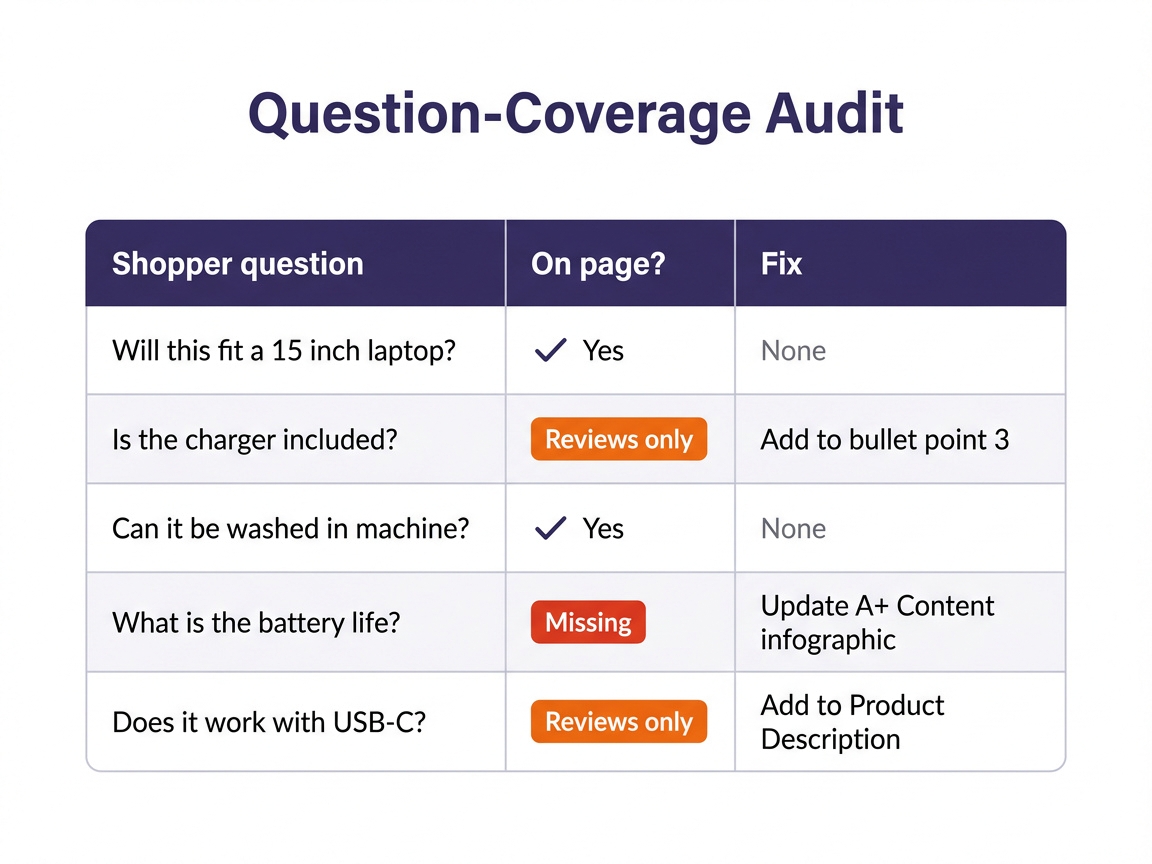
- 1. Collect 20 real questions. Pull them from customer questions on your page and competitors’ pages, review complaints, return reasons, and long-tail queries in your search terms. Phrase them the way a shopper would: “Will this fit a 15-inch laptop?”, “Is it safe for a 2-year-old?”, “Good gift for a runner?”
- 2. Mark each one. Answered clearly on the page (title, bullets, A+, attributes), answered only in reviews, or not answered.
- 3. Fill the gaps. Every “not answered” question becomes a fact in a bullet, an A+ module, an attribute or an image callout.
- 4. Test it. Ask the same questions in the Alexa for Shopping chat in the Amazon app. Note whether your product appears and how it’s described.
- 5. Repeat monthly on your top ASINs, and after any big review or return trend.
For the long-tail query data, our guide to Search Query Performance shows where to find the questions shoppers actually type.
Fixes by Listing Section
| Section | What to add or change |
|---|---|
| Title | Product type, key attribute and size or count in plain words. Keep it readable; don’t stack synonyms |
| Bullets | One fact per bullet with a number where possible: dimensions, material, capacity, compatibility, age range, what’s included |
| Use cases | Who it’s for and when they use it: “for small apartments”, “for marathon training”, “gift for new parents” |
| A+ content | A comparison chart across your own range, and a short FAQ module answering the top questions |
| Attributes | Fill every relevant attribute field. Structured data is the easiest thing for any system to read |
| Images | A clear main image for photo search, plus infographics that repeat key facts in text |
Our guides to bullet points, A+ content and image optimization cover each section in more depth.
Reviews: The Part You Can’t Write
Amazon names reviews as a source, and the assistant can summarize what customers say. If 15% of reviews say the lid leaks, expect that to come up when a shopper asks whether it’s leak-proof. You can’t edit reviews, but you can:
- fix the product or packaging issue behind repeat complaints,
- set accurate expectations on the page, so the wrong buyers don’t purchase and complain,
- watch return reasons, which often show the same gap. Our Frequently Returned badge guide covers how returns feed back into the listing.
Reorders, Price Alerts and Deals
Shoppers can ask the assistant to reorder “the laundry detergent I bought last month” or to buy when a price drops. Three things follow:
- Keep titles and variations stable on repeat-purchase products, so a reorder finds the same item.
- Expect more price-triggered buying. Price history and auto-buy reward real discounts. See Amazon price history and auto-buy.
- Ads exist here too. Sponsored Prompts place brand suggestions inside the assistant’s answers. Organic optimization and ads work together.
Decision Rules: What to Fix First
| If this is true | Do this first |
|---|---|
| High-traffic ASIN with returns marked “not as described” | Question-coverage audit and bullet rewrite. This also cuts returns |
| Comparison-heavy category (electronics, appliances, baby) | Add specs in bullets and a comparison chart in A+ |
| Giftable product in Q4 | Add gift angles and recipient use cases to bullets and images |
| Repeat-purchase product | Stabilize title and variations; consider Subscribe and Save |
| Reviews repeat the same complaint | Fix the product or packaging, then set expectations on the page |
| Listing already answers the top 20 questions | Stop rewriting. Spend the time on images, reviews and ads |
What Not to Do
Don’t buy tools or services that promise to “rank you in Alexa for Shopping” with a secret formula. Amazon hasn’t published how it chooses products. Don’t strip keywords out of your listing either: regular search still drives most traffic, and the same clear facts serve both. For the wider picture of AI shopping agents beyond Amazon, see our post on Amazon vs Perplexity and AI shopping agents and Shop Direct and Buy for Me.
Related Reading
Frequently Asked Questions
How do I optimize my listing for Alexa for Shopping?
Make the listing answer shoppers’ questions in plain, factual language: size, material, compatibility, who it’s for and what’s included. Fill attributes, add use cases, fix repeat review complaints, and test the top questions in the Alexa for Shopping chat.
Is Alexa for Shopping the same as Rufus?
Yes. Amazon renamed Rufus to Alexa for Shopping in May 2026 when it merged the assistant with Alexa+. Our main guide is titled “What is Amazon Rufus” because many sellers still search that name.
Can shoppers buy through Alexa for Shopping by text?
Yes. Since November 6, 2026, shoppers can text Alexa for Shopping to find products, compare options, build carts and buy with approval. Amazon said on November 13 the feature was widely available to Alexa for Shopping customers.
Does Amazon tell sellers how Alexa for Shopping ranks products?
No. Amazon has said what the assistant draws on (product details, reviews, shopping history and preferences, and products across the web) but not how it ranks or chooses them.
Can I advertise inside Alexa for Shopping?
Yes, through Sponsored Prompts, which place brand suggestions inside the assistant’s answers. Ads work best when the listing already answers the questions the prompt raises.
Can Alexa for Shopping Answer Questions About Your Product?
Send us your store or ASIN. We run the 20-question coverage audit, show you which answers are missing from your listing, and send you the exact bullet and A+ lines to add.
Free. No obligation. Useful findings even if we don’t work together.
See our listing optimization service and our client results.
Source: Amazon, text Alexa for Shopping.
Written by the AMZ Scaler Team
Amazon advertising and listing specialists with 5+ years managing PPC and listing optimization for brands across the US, UK, and Canada. We publish what we apply in real seller accounts every day.