
Quick Answer
Amazon shows the “Frequently returned item” badge on products whose return rate is well above similar products in the same category. Amazon does not publish the threshold, which varies by category, and there is no dispute process. The badge goes away once your return rate stays below the category level for a sustained period. To fix it, read your return reasons in the Voice of the Customer dashboard, find the expectation gap or quality issue behind them, fix the listing or product, and wait for new orders to replace the old return data.
Key Takeaways
- The badge compares your return rate with similar products, so a 6% return rate can be fine in one category and a problem in another.
- There is no appeal. Lowering the return rate is the only way to remove it.
- Most avoidable returns come from a gap between what the listing promised and what arrived.
- Fixes only change future orders, so recovery takes weeks, not days.
- Its opposite, “Customers usually keep this item”, is a trust signal worth earning.
Table of Contents
- What the Badge Is
- Why It Hurts More Than Returns Alone
- How to Find the Real Cause
- How to Fix It by Return Reason
- How to Prevent It
- Frequently Asked Questions
What the Badge Is
When a product is returned much more often than comparable products, Amazon can show a “Frequently returned item” notice on the detail page. What is consistent across seller reports:- It is relative. Your rate is compared with similar products in your category, not with a single number for all of Amazon.
- Amazon does not publish thresholds. Categories where returns are normal, like apparel, tolerate more than categories where they are rare.
- There is no dispute path. You cannot appeal the badge itself.
- It clears on its own once your return rate stays below the category level for long enough.
Why It Hurts More Than Returns Alone
A return costs you the refund, fees, and often the unit. The badge costs you the sales that never happen because shoppers see the warning and buy something else. Lower conversion also makes every ad click more expensive, so ACoS rises across every campaign for that product. Build both effects into your unit economics, not just the refund cost.How to Find the Real Cause
- Open Voice of the Customer and read the return comments for the ASIN, not just the reason codes.
- Group the reasons. Count how many are about fit or size, quality or defects, not as described, wrong item or variation, and changed mind.
- Read the negative reviews. They often say exactly what shoppers expected that the product did not deliver.
- Look at the listing with fresh eyes. Compare the main image, title, and bullets with the comments. The gap is usually visible.
- Check the variation set. Wrong item returns often mean variations are mislabeled or images are attached to the wrong child.
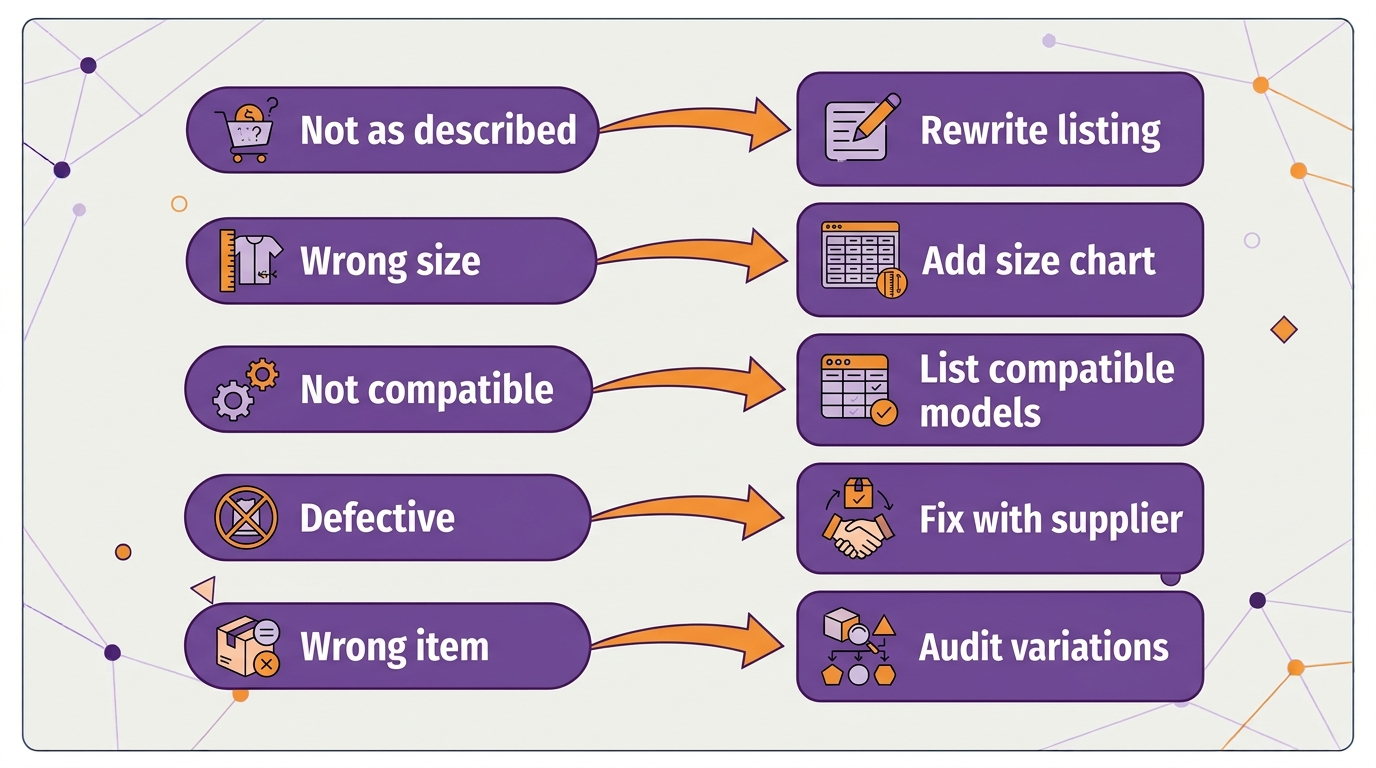
How to Fix It by Return Reason
| Return reason | Likely cause | Fix |
|---|---|---|
| Not as described | Listing oversells or is vague | Rewrite title and bullets to match the product exactly; add real photos |
| Wrong size or does not fit | Missing or unclear sizing | Add a size chart image and exact dimensions; clarify fit in bullets |
| Not compatible | Compatibility not stated | List compatible and incompatible models clearly |
| Defective or damaged | Quality or packaging problem | Inspect returned units; fix with supplier; improve packaging |
| Wrong item | Variation or labeling error | Audit variation images and labels |
| No longer needed | Buyer remorse | Usually normal; consider partial refunds for this reason |
How to Prevent It
- Check return rate by ASIN monthly, especially after a listing change or a new supplier batch.
- Write listings to set expectations, not just to sell. Size, material, what is included, and what it does not do.
- Inspect a sample of every new batch before it ships to Amazon.
- Answer common questions in the listing. If buyers keep asking the same thing in reviews, the listing should answer it.
Related Reading
Frequently Asked Questions
What does “Frequently returned item” mean on Amazon?
It is a notice Amazon shows on product pages when a product’s return rate is well above similar products in its category. It warns shoppers before they buy.What return rate triggers the Frequently returned item badge?
Amazon does not publish a threshold. It compares your return rate with similar products, so the trigger point varies by category.Can I appeal the Frequently returned item badge?
No. There is no dispute process for the badge. It is removed automatically once your return rate stays below the category level for a sustained period.How long does it take to remove the badge?
It depends on how quickly new orders with fewer returns replace the old data. Plan for several weeks after you fix the cause, longer for slow-selling products.What is the “Customers usually keep this item” badge?
It is a positive signal Amazon can show on products with a return rate well below their category. It reassures shoppers and is worth protecting with accurate listings. See our Amazon listing optimization service and our client results. Sources: Amazon Seller Central, Voice of the Customer; Amazon Seller Central, product detail page rules.Written by the AMZ Scaler Team
Amazon advertising and listing specialists with 5+ years managing PPC and listing optimization for brands across the US, UK, and Canada. We publish what we apply in real seller accounts every day.