
Quick Answer
To audit Amazon creator placements, open the Sponsored Products placement report and compare off-Amazon spend, conversion rate and ACoS with on-Amazon placements for each campaign. Off-Amazon clicks bill at your normal CPC, capped by your max bid, and Top of Search and Product Page adjustments don’t apply. Where off-Amazon ACoS is above break-even, switch the campaign’s off-Amazon setting from Increase reach to Limit off-Amazon spend, or exclude specific creators. Add poor inferred search terms as negatives (Nova).
Key Takeaways
- Creator placements started on August 10, 2026, with existing campaigns enrolled by default.
- They bill like normal Sponsored Products clicks and count against the same budget.
- Each campaign has a setting for ads served off Amazon: Increase reach (default) or Limit off-Amazon spend.
- You can exclude specific creators. There’s no documented account-wide switch to remove creator inventory.
- Off-Amazon placements without a search query get an inferred search term, and you can negative it.
Table of Contents
- What creator placements are
- What they can cost: a worked example
- The 30-minute audit
- Inferred search terms
- Your controls
- Decision rules
- When to leave them on
- FAQ
What Creator Placements Are
Creators in the Amazon Influencer Program can feature advertised products in their reviews, editorial content and buying guides. A shopper who clicks lands on your detail page, and you pay per click as usual. This sits inside Amazon’s off-Amazon ad serving, alongside the third-party sites and apps Sponsored Products already reached. Our news post on Sponsored Products in creator content covered the August launch.| Rule | Detail |
|---|---|
| Start | August 10, 2026, enrolled by default at current bids and budgets |
| Markets | US, Canada, Mexico, Brazil, India, Turkey, Middle East, North Africa and select EU countries. The UK was not on the published list |
| Billing | Standard cost per click, capped by your max bid, counted against campaign budget |
| Bid adjustments | Top of Search and Product Page adjustments don’t apply off Amazon. Dynamic bidding does |
| Controls | Campaign setting (Increase reach or Limit off-Amazon spend), creator exclusions, site and app deny lists |
What They Can Cost: A Worked Example
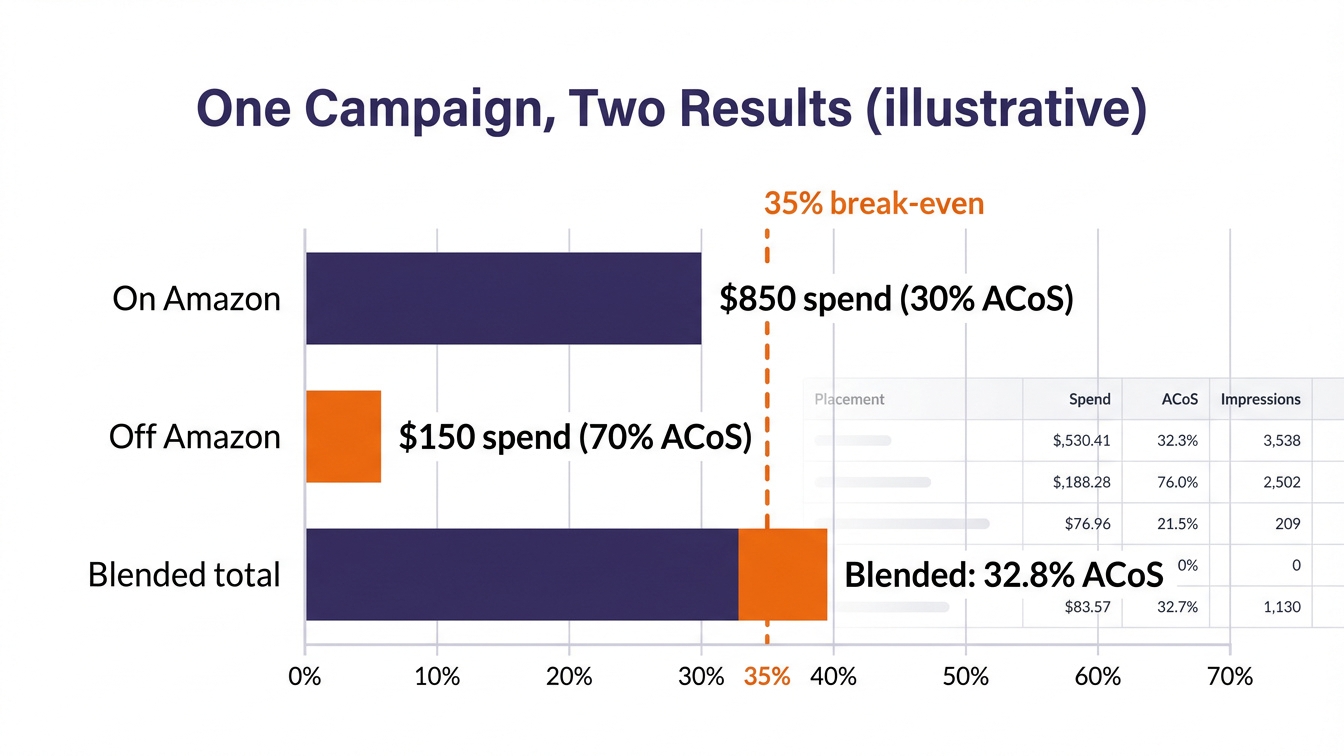
Take an illustrative campaign spending $1,000 a month, with a break-even ACoS of 35%:| Placement | Spend | Sales | ACoS |
|---|---|---|---|
| On Amazon | $850 | $2,833 | 30% |
| Off Amazon (incl. creators) | $150 | $214 | 70% |
| Campaign total | $1,000 | $3,047 | 32.8% |
The 30-Minute Audit
- 1. Pull the placement report. In the ads console, go to Measurement and Reporting, create a Sponsored Products placement report for the last 60 days, broken out by campaign. Off-Amazon delivery shows as its own placement line (the exact label can vary by account and report version).
- 2. Sort by off-Amazon spend. Focus on the campaigns where it’s more than about 5% of spend. Below that, the effect is small.
- 3. Compare each campaign’s off-Amazon ACoS and conversion rate with its on-Amazon numbers and with your break-even ACoS.
- 4. Check the search term report for inferred terms on those campaigns (see below). Negative the irrelevant ones, as in our search term optimization guide.
- 5. Change the setting where it fails. Switch to Limit off-Amazon spend on campaigns that lose money off Amazon. Exclude specific creators where your brand doesn’t fit their content.
- 6. Recheck in 30 days. Off-Amazon delivery changes as Amazon adds inventory.
Inferred Search Terms
Creator content and social placements have no shopper query. Amazon says it will “infer and provide a search term with customer context that best matches the advertised product” (PPC Land, quoting Amazon). These inferred terms show up in your search term report like real queries. Treat them the same way: if an inferred term spends without converting, add it as a negative. Our negative keywords guide covers match types.Your Controls
| Control | Level | Use it when |
|---|---|---|
| Limit off-Amazon spend | Campaign | Off-Amazon ACoS is above break-even on that campaign |
| Creator exclusions | Advertiser | A creator’s content or audience doesn’t fit your brand |
| Site and app deny lists | Advertiser | Specific third-party sites or apps waste spend or raise brand-safety concerns |
| Negative keywords on inferred terms | Campaign or ad group | Inferred terms spend without converting |
| Max bid | Ad group or keyword | Off-Amazon clicks never cost more than your max bid, so bid discipline still applies |
Decision Rules
| What the placement report shows | Do this |
|---|---|
| Off-Amazon ACoS below break-even | Keep Increase reach. Recheck monthly |
| Off-Amazon ACoS above break-even, meaningful spend | Switch that campaign to Limit off-Amazon spend |
| Branded or exact-match defense campaigns | Limit off-Amazon spend. These campaigns exist for precise intent |
| Discovery or launch campaigns converting off Amazon | Keep it on. Creator traffic can find new buyers cheaply |
| Brand-sensitive category (baby, health, beauty) | Review which creators feature you and exclude poor fits |
| Inferred terms spending without sales | Add them as negatives, then reassess the campaign setting |
When to Leave Them On
Don’t switch off-Amazon delivery off across the account by reflex. Creator content reaches shoppers who are still deciding, and for giftable, visual or lifestyle products it can bring sales your keyword campaigns miss. The point of the audit is to keep the placements that pay and cut the ones that don’t, one campaign at a time. It also belongs on your regular PPC audit checklist.Related Reading
Frequently Asked Questions
How do I turn off creator placements in Amazon Sponsored Products?
There’s no documented account-wide switch. At campaign level, change the setting for ads served off Amazon from Increase reach to Limit off-Amazon spend. You can also exclude specific creators.Where can I see creator placement performance?
In the Sponsored Products placement report under Measurement and Reporting in the ads console, broken out by campaign. Off-Amazon delivery appears as its own placement.Do placement bid adjustments apply to creator placements?
No. Top of Search and Product Page adjustments don’t apply off Amazon. Your base bid applies, capped by your max bid. Dynamic bidding strategies still apply.What are inferred search terms in my search term report?
Terms Amazon assigns to off-Amazon placements that had no shopper query, such as creator content or social placements. They appear like normal search terms and can be added as negatives.Are creator placements available in the UK?
The UK was not on the list of marketplaces published for off-Amazon placements at launch. Check the off-Amazon setting in your own UK campaigns to confirm.Is Off-Amazon Spend Hiding in Your Good Campaigns?
Send us your store or ASIN. We pull your placement report, show which campaigns lose money off Amazon, and tell you where to limit, exclude or keep creator placements.
Audit My Off-Amazon SpendFree. No obligation. Useful findings even if we don’t work together.
Example result: ACoS cut from 76% to 28% in two months, with ad sales up 47%, for one client account. See the case study. Results vary by category, competition and listing quality.
Written by the AMZ Scaler Team
Amazon advertising and listing specialists with 5+ years managing PPC and listing optimization for brands across the US, UK, and Canada. We publish what we apply in real seller accounts every day.