
Quick Answer
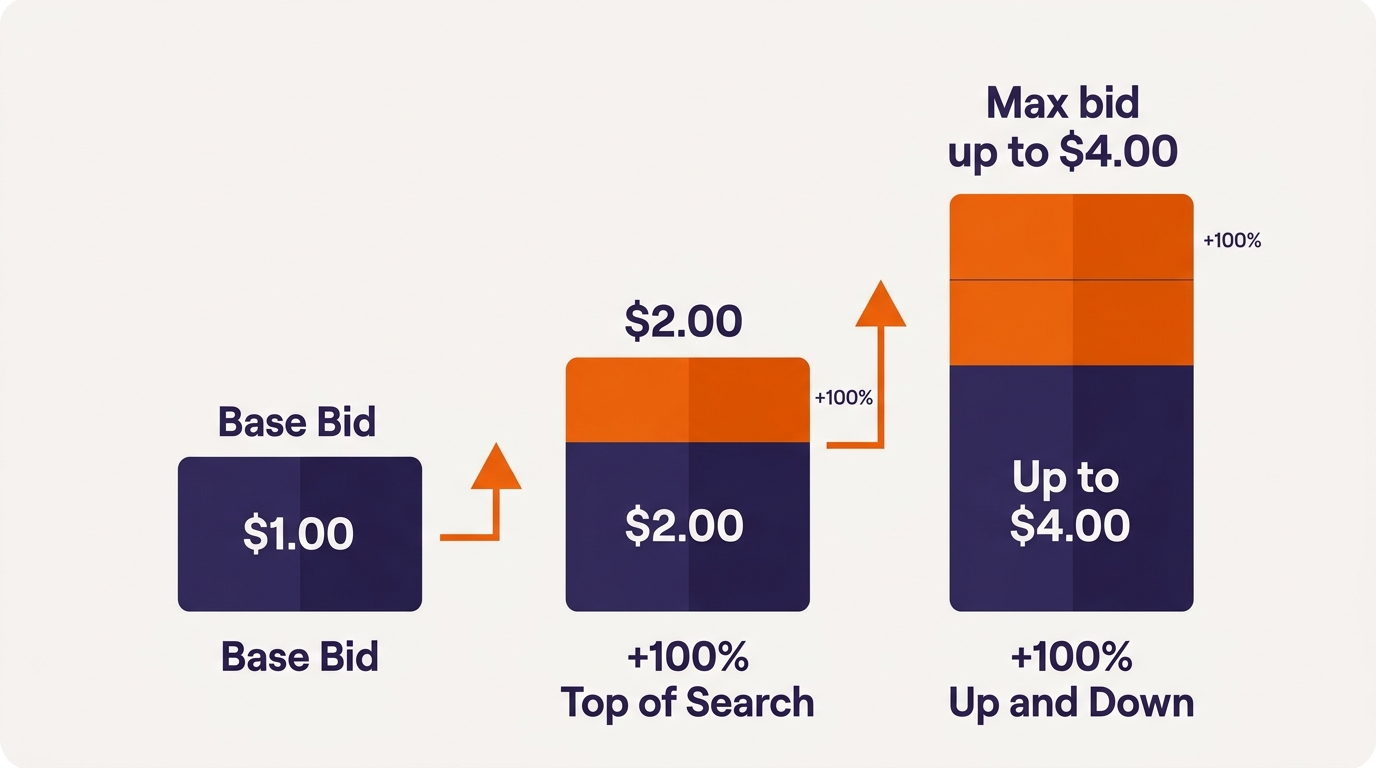
Amazon Sponsored Products has three bidding strategies: dynamic bids down only (Amazon lowers your bid when a sale is unlikely), dynamic bids up and down (Amazon can raise your bid by up to 100% when a sale is likely, and lower it when not), and fixed bids. Separately, placement adjustments let you raise bids by up to 900% for top of search, rest of search, and product pages. They stack, so a $1.00 bid with a 100% top-of-search adjustment and up and down bidding can reach $4.00.
Key Takeaways
- Down only is the safest default for new or unproven campaigns.
- Up and down can double your bid when Amazon predicts a sale.
- Placement adjustments go up to 900% per placement.
- Placement adjustments and dynamic bidding multiply together.
- Base every setting on placement data, not guesswork.
Table of Contents
- The Three Bidding Strategies
- Placement Adjustments
- How They Stack
- Which to Use When
- What Changed in 2026
- When Not to Use Placement Boosts
- FAQs
The Three Amazon Bidding Strategies
| Strategy | What Amazon does | Best for |
|---|---|---|
| Dynamic bids, down only | Lowers your bid in real time when a click is less likely to convert | New campaigns, discovery, tight budgets |
| Dynamic bids, up and down | Raises your bid by up to 100% when a sale is likely, lowers it when not | Proven campaigns with strong conversion |
| Fixed bids | Uses your exact bid with no adjustment | Brand defense, tight cost control, testing |
Placement Adjustments
Placement adjustments raise your bid for specific places your ad can appear: top of search (the first row of results on page one), rest of search, and product pages. Each can be raised by 0% to 900%. Amazon added the rest of search control after the other two, so you can now tune all three. Check performance by placement in the Placements tab of each campaign before changing anything.How Bids Stack (the Part That Surprises People)
Amazon applies the placement adjustment first, then dynamic bidding on top. Here is an illustrative example, not a recommendation:- Base bid: $1.00
- Top of search adjustment of 100%: bid becomes $2.00
- Up and down bidding adds up to 100%: bid can reach $4.00
Which Strategy to Use When
- New product or discovery campaign: down only, no or small placement adjustments. Gather data first.
- Proven exact-match winners: consider up and down, with a moderate top of search adjustment if placement data shows top of search converts better.
- Brand defense: fixed bids often work well, since brand terms usually convert reliably.
- Launch with aggressive goals: up and down can buy visibility faster, accepting a higher ACoS. Judge it on TACoS over the launch window.
- Change gradually: adjust placements in steps of 25% to 50% and give each change a couple of weeks of data.
What Changed in 2026
Sponsored Products can now serve in creator content off Amazon, and top of search and product page adjustments do not apply there, so campaigns can behave differently than their settings suggest. See our creator content placement post. Ads also now appear inside Amazon’s AI assistant, where relevance of your listing matters alongside the bid.When Not to Use Placement Boosts
Avoid big placement adjustments on broad and auto campaigns, on new products without conversion data, and on any campaign where you have not checked the maximum stacked bid. High boosts on low-intent traffic are one of the most common sources of runaway CPCs, which our PPC audit checklist flags.Note: Top of Search and Product Page adjustments don’t apply to off-Amazon and creator placements. See how to audit off-Amazon spend.
Bid settings are where small mistakes get expensive. If you want them set from your real margins, our Amazon PPC management work does exactly that. See the results on our client results page.Frequently Asked Questions
What is the best bidding strategy on Amazon PPC?
There is no single best one. Down only suits new and discovery campaigns, up and down suits proven high-converting campaigns, and fixed bids suit brand defense and tight cost control.How much can dynamic bidding raise my bid?
Amazon’s current guide says up and down bidding can raise bids by up to 100%. Older guidance said 100% for top of search and 50% elsewhere, so check the wording in your Ads console.What is the maximum placement adjustment on Amazon?
Up to 900% each for top of search, rest of search, and product pages in Sponsored Products campaigns.Do placement adjustments and dynamic bids stack?
Yes. The placement adjustment applies first, then dynamic bidding on top. A $1.00 bid with a 100% top of search adjustment and up and down bidding can reach $4.00.Should I raise my top of search adjustment?
Only if your placement report shows top of search converts well enough to justify the higher cost. Raise it gradually and check that the maximum stacked bid stays below your break-even cost per click.Written by the AMZ Scaler Team
Amazon advertising and listing specialists with 5+ years managing PPC and listing optimization for brands across the US, UK, and Canada. We publish what we apply in real seller accounts every day.