
Quick Answer
Amazon PPC dayparting is scheduling bids or budgets by hour or day. Natively, Amazon offers schedule-based bid rules for Sponsored Products and schedule-based budget rules by hour of day, both of which increase bids or budget during the windows you choose (Amazon Ads). To spend less at weak hours, lower your base bid slightly and use a scheduled rule to raise it during strong hours. Use at least two to four weeks of hourly data before changing anything, and remember Amazon reports in the marketplace’s time zone, not yours.
Key Takeaways
- Dayparting is worth doing when hourly data shows a clear gap, such as overnight hours converting at half the daytime rate.
- Amazon’s native schedule rules raise bids or budgets during chosen windows. They do not lower or pause, so you build dayparting by lowering the base and boosting the good hours.
- Schedule-based budget rules by hour of day help campaigns that run out of budget before the evening peak.
- Use the marketplace’s time zone. If you or your team work in another time zone, convert before you read hourly data.
- Skip dayparting on low-data campaigns and during big sales events, when shopping patterns change.
Table of Contents
- What Amazon PPC Dayparting Is
- What Amazon Lets You Do Natively
- How to Find Your Best and Worst Hours
- How to Set Up Dayparting Step by Step
- Worked Example
- When NOT to Daypart
- Frequently Asked Questions
What Amazon PPC Dayparting Is
Dayparting is the ad version of staffing a shop for its busy hours. Instead of bidding the same amount at 3am as at 8pm, you spend more when conversion rates are high and less when they are low. On Amazon it matters for two reasons. First, overnight clicks often convert worse, so the same bid buys less profit. Second, campaigns that hit their daily budget early stop showing during the evening, which is often when shoppers buy. Both show up as wasted ad spend if nobody looks at hourly data.What Amazon Lets You Do Natively
| Tool | What it does | Limits |
|---|---|---|
| Schedule-based bid rules (Sponsored Products) | Raise bids during chosen times of day, days of the week, or date ranges | Increases only; Sponsored Products only |
| Schedule-based budget rules | Raise daily budget by hour of day, day of week, or date range | Increases only |
| Hourly performance reports | Show clicks, spend, sales, and conversions by hour | Short history, so export regularly |
| Amazon Marketing Stream | Sends hourly campaign data to your own systems through the API | Needs API access and developer setup |
How to Find Your Best and Worst Hours
- Pull at least two to four weeks of hourly data. A single day is noise. Look at the same hours across many days.
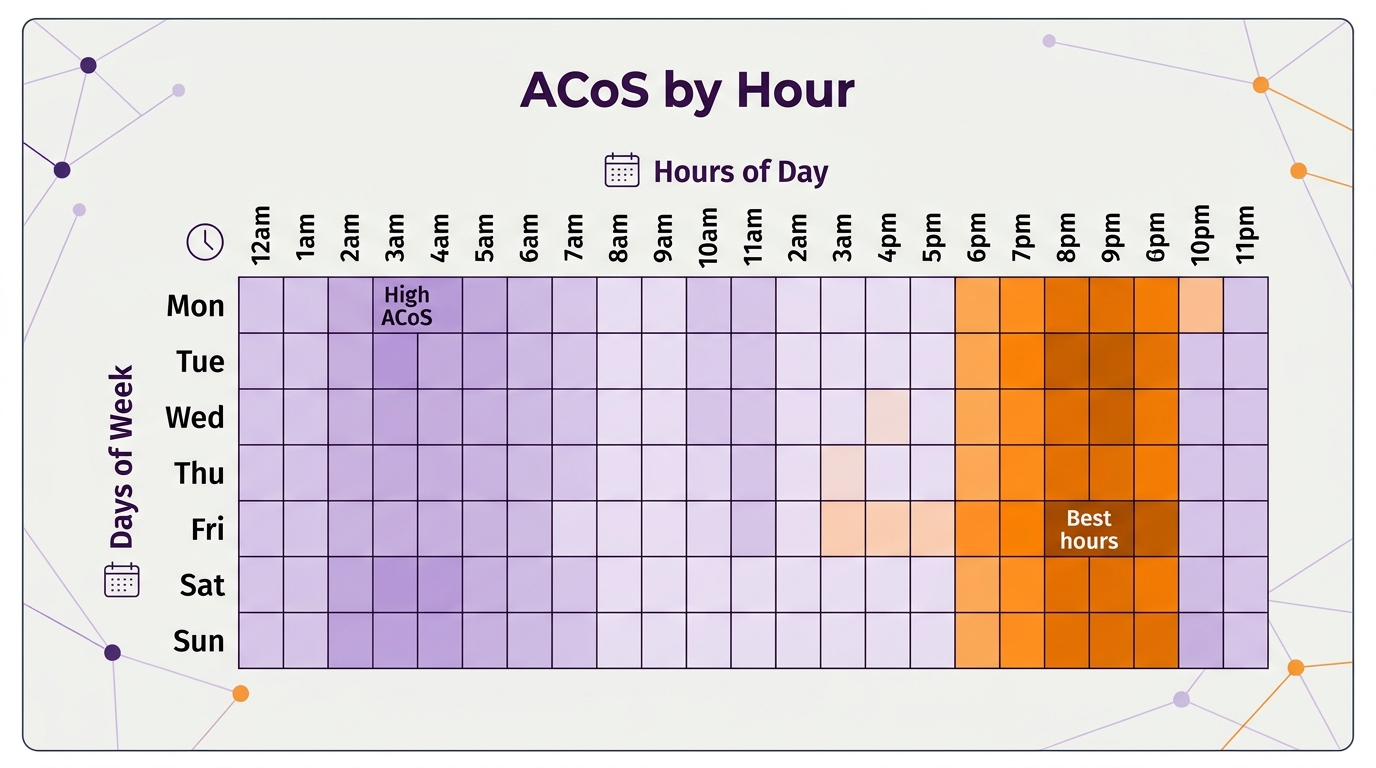
- Compare conversion rate and ACoS by hour, not just spend. An hour with high spend and high conversion is your best hour, not your worst.
- Group hours into blocks. Overnight, morning, afternoon, and evening blocks are easier to act on than 24 separate numbers.
- Check when budgets run out. If a campaign stops spending at 3pm every day, the problem is budget, not bids.
- Convert to the marketplace time zone. Amazon reports in marketplace time, so if you manage a US account from Europe or Asia, the hours in your report are not your local hours.
How to Set Up Dayparting Step by Step
- Pick one campaign with enough data. Start with a high-spend Sponsored Products campaign, not your whole account.
- Set the base bid for your weak hours. Lower the base bid to what your weak hours can afford, using your break-even CPC.
- Add a schedule-based bid rule for strong hours. Raise bids during the blocks where conversion is clearly higher.
- Add a budget rule if budget runs out early. Increase budget for the evening window so the campaign stays live when shoppers convert.
- Run it for two weeks, then compare. Check total orders, ACoS, and spend against the two weeks before. Keep what works, undo what does not.
Worked Example
An illustrative US campaign with a $100 daily budget, before and after dayparting:| Before | After | |
|---|---|---|
| Base bid | $1.20 all day | $1.00 base |
| Scheduled bid rule | None | +20% from 9am to 11pm marketplace time |
| Share of spend from 1am to 6am | 18% at 52% ACoS | 9% at 44% ACoS |
| Budget runs out | Around 4pm | Lasts into the evening |
| Campaign ACoS | 31% | 26% |
When NOT to Daypart
- Low-data campaigns. If a campaign gets a few orders a day, hourly patterns are random. Fix keywords and bids first.
- Big sales events. During Prime Day or Black Friday Week, shopping happens around the clock and deals drop at set times. Turn schedules off or rebuild them for the event.
- Launches. New products need data from every hour to learn. Daypart once the product has a steady sales history.
- Accounts with structural problems. Dayparting fine-tunes a healthy account. It will not fix wasted search terms or bad targeting.
Related Reading
Frequently Asked Questions
Does Amazon have built-in dayparting?
Partly. Amazon offers schedule-based bid rules for Sponsored Products and schedule-based budget rules that can target hours of the day. Both increase bids or budget during chosen windows. Pausing on a schedule needs a third-party tool.What time zone does Amazon use for dayparting?
Amazon uses the marketplace’s time reference for reporting, so build schedules in that time zone. For the US marketplace, that is US time, not your local time.How much data do I need before dayparting?
Use at least two to four weeks of hourly data on a campaign with steady daily orders. Less than that, and hourly differences are mostly noise.Should I pause campaigns overnight?
Usually not. Pausing stops all data and can lose cheap sales from night shoppers. Lowering the base bid and boosting strong hours is gentler and keeps the campaign learning.Does dayparting work for Sponsored Brands and Sponsored Display?
Schedule-based bid rules are for Sponsored Products. Schedule-based budget rules cover more sponsored ad types. For hour-by-hour bid control beyond that, you need a third-party tool or the API. See our Amazon PPC management service and our client results. Sources: Amazon Ads, schedule-based bid rules for Sponsored Products; Amazon Ads, hours of day for schedule-based budget rules; Amazon Ads, Amazon Marketing Stream.Written by the AMZ Scaler Team
Amazon advertising and listing specialists with 5+ years managing PPC and listing optimization for brands across the US, UK, and Canada. We publish what we apply in real seller accounts every day.
More in Amazon PPC Basics
- Amazon Search Term Optimization: Start With Where Your Spend Actually Goes →
- Amazon Ranking Campaigns: 5 Mistakes That Burn Budget (and How to Fix Them) →
- Amazon Customer Lifetime Value: How Repeat Buyers Change Your ACoS Target →
- Amazon Black Friday PPC Strategy 2026: Budgets, Bids and the Week After →