
Amazon variation PPC goes wrong in a predictable way. A seller puts every size and color of a product into one ad group, sets one bid, and lets Amazon decide which child to show. The cheapest variation gets the clicks, the margin sits on a different child, and the ACoS report blends the two into a number that tells you nothing. This guide shows which child ASIN to advertise, how to set bids per variation from real margins, and the decision rules we use to choose between one ad group and separate ones.
Quick Answer
In Amazon variation PPC, you advertise child ASINs, because the parent is a non-buyable container. Advertise the children that combine strong conversion, healthy margin and enough stock to hold the featured offer, since ads only run on in-stock products that win it (Amazon Ads). Bids apply to every product in an ad group, so group children by similar price and conversion rate, and give high-margin children their own ad groups. Judge results at the family level using the purchased product report, because a click on one child often buys another.
Key Takeaways
- The parent ASIN can’t be advertised. Every Sponsored Products decision is about which children to advertise and at what bid.
- One bid covers every product in an ad group, so children with very different prices or margins should not share one.
- The cheapest child usually converts best but can afford the lowest cost per click. Work out max CPC per child before you choose.
- A click on one variation often ends in a sale of another. Read the purchased product report before pausing a child that looks unprofitable.
- Map attribute keywords (size, color, count) to the matching child, and use a hero child for generic keywords.
Table of Contents
- How variations work in Sponsored Products
- Max CPC per child: a worked example
- Three ways to structure variation campaigns
- Mapping keywords to the right child
- Reading cross-variation sales
- Decision rules
- When not to split variations
- FAQ
How Variations Work in Sponsored Products
A variation family is one parent with several children that differ by an approved attribute, such as size, color, scent or count. Shoppers see one detail page and switch between options there. Reviews and ratings usually display across the family, which is a big reason sellers group products this way.
For advertising, three rules matter:
- You advertise children. The parent is not buyable, so it can’t be an advertised product. Each child you add to an ad group is a separate advertised ASIN with its own clicks, spend and sales.
- Only in-stock children that win the featured offer run. Amazon says products need to be in stock to be the featured offer and eligible for advertising (Sponsored Products best practices). A child that runs out stops serving, even if its siblings are fine.
- Bids are set per ad group, not per product. Amazon’s own advice is to group products by price range and conversion within the same category. A $14 size and a $34 size in one ad group are bid as if they were worth the same per click. They are not.
Max CPC per Child: A Worked Example
Take an illustrative supplement sold in three sizes. Max CPC is price × conversion rate × break-even ACoS (our break-even CPC guide explains each input):
| Child | Price | Profit before ads | Break-even ACoS | Conversion rate | Max CPC |
|---|---|---|---|---|---|
| 8 oz | $14 | $3.50 | 25% | 14% | $0.49 |
| 16 oz | $22 | $7.70 | 35% | 12% | $0.92 |
| 32 oz | $34 | $13.60 | 40% | 8% | $1.09 |
Now imagine the main generic keyword costs about $0.85 a click. The 8 oz converts best, and in a mixed ad group it often wins the most clicks, but it loses money on that keyword unless its conversion rate nearly doubles (it would need about 24%). The 16 oz and 32 oz can afford it. The fix is not a lower bid for the whole family. It’s sending generic traffic to the children that can pay for it, and keeping the 8 oz on cheaper long-tail and branded terms.
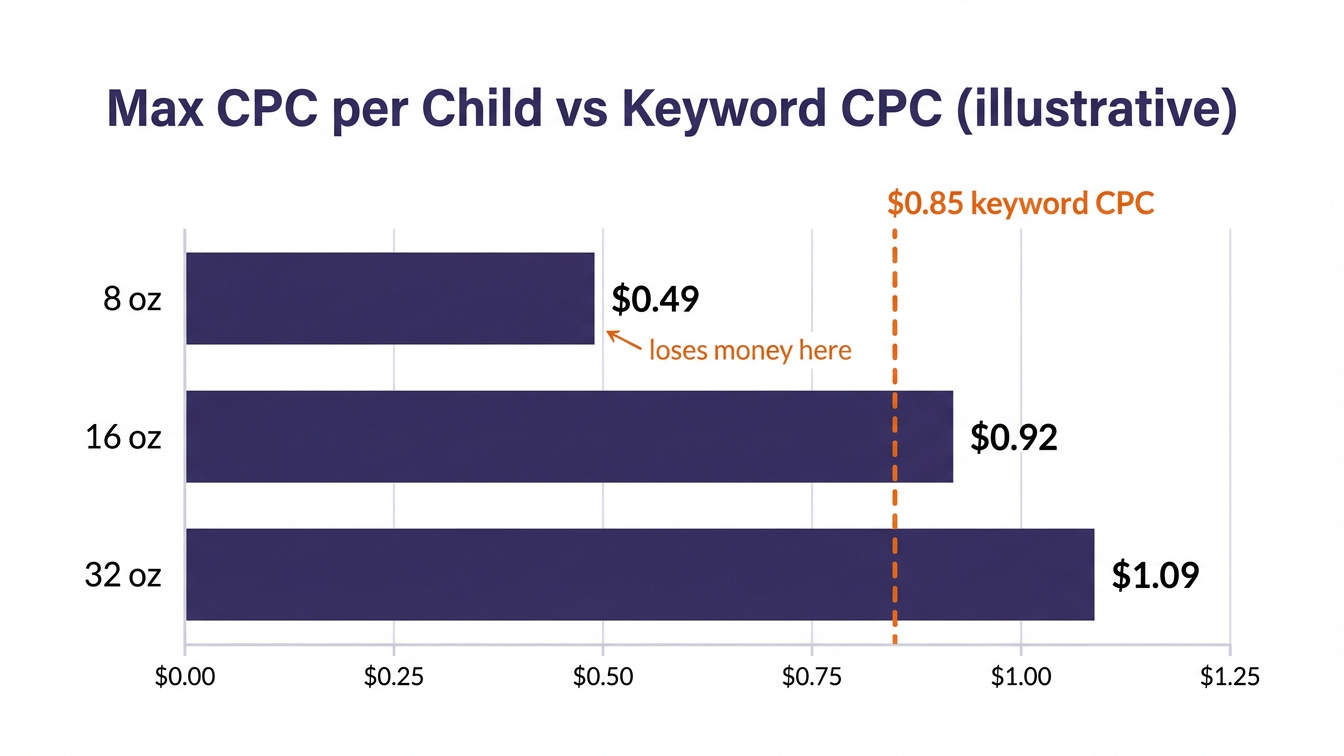
Run the same numbers for your own family in our ACoS and max bid calculator. Use child-level conversion from the Detail Page Sales and Traffic by Child Item report in Business Reports, not the parent average.
Three Ways to Structure Variation Campaigns
| Structure | How it works | Best for | Risk |
|---|---|---|---|
| All children, one ad group | Every child in one ad group, one bid per keyword | Families where children share price and margin (colors of the same item) | Amazon picks the child; blended reports hide losers |
| Price-tier ad groups | Children grouped by price or margin band, each with its own bids | Sizes, counts and multipacks with different prices | More ad groups to manage; keep negatives in sync |
| Hero child plus attribute groups | One hero child on generic keywords; other children only on their attribute keywords | Families with one clear best seller and searchable attributes | Hero stockouts stop the generic traffic; keep a backup child ready |
Whichever you choose, keep it inside the product-level structure from our Amazon PPC campaign structure guide, so variation ad groups don’t end up competing for the same search terms.
Mapping Keywords to the Right Child
Shoppers often tell you which variation they want. Use that:
- Attribute keywords (“32 oz protein powder”, “black yoga mat”, “pack of 12”) go to the matching child only. Add them as exact match in that child’s ad group, and as negative exact in the others.
- Generic keywords (“protein powder”, “yoga mat”) go to the hero child or the price tier that can afford the CPC.
- Branded keywords can carry the cheapest child. Shoppers searching your brand convert well and switch sizes on the page.
Your search term report shows which attribute words shoppers actually type. Our guide to search term optimization covers the harvesting routine, and negative keywords explains how to keep children from bidding against each other.
Reading Cross-Variation Sales
When a shopper clicks the ad for one child and buys another, the sale is still credited to the ad, but as a sale of a different product. Two reports show it:
- Advertised product report: splits sales into the advertised product and other products bought after the click.
- Purchased product report: shows exactly which products were bought after a click on each advertised product.
Judge a variation family on total ad sales and profit across all children, then look at each child’s role. A child that brings cheap clicks and passes buyers to a higher-margin sibling is doing its job. A child that brings expensive clicks and sells nothing in the family is not. Our guide to a good ACoS explains why the family number, not each child’s, should be compared to break-even.
Decision Rules
| If this is true | Do this |
|---|---|
| Children share price and margin (colors of one item) | One ad group, all in-stock children. Let Amazon pick |
| Children differ by more than about 30% in price or margin | Split into price-tier ad groups with their own bids |
| One child is the clear best seller and is well stocked | Make it the hero on generic keywords; other children on attribute keywords |
| A child’s max CPC is below the keyword’s going CPC | Remove it from that keyword; keep it on branded and long-tail terms |
| A child looks unprofitable alone | Check the purchased product report before pausing. Pause only if its clicks don’t sell anything in the family |
| A child is low on stock | Pull it from generic keywords first, so it doesn’t run out and lose the featured offer mid-campaign |
| The family converts poorly across every child | Fix the listing first: images, size guide, price ladder. More bids won’t fix the page |
When Not to Split Variations
Splitting a variation family into many ad groups only helps if the children really differ in price, margin or search demand. If you sell five colors of the same item at the same price, one ad group is simpler and gives Amazon more data. Don’t break a family apart in the catalog to get separate ads either: you lose shared reviews, and grouping products that aren’t true variations of each other breaks Amazon’s variation rules.
If the whole family underperforms, the problem is usually the page. Check the images, the size or color selector and the price steps between children with our image optimization guide before you change any bids.
Related Reading
Frequently Asked Questions
Can you advertise a parent ASIN on Amazon?
No. The parent is a non-buyable container that groups the children on one detail page. In Sponsored Products you choose child ASINs, and shoppers can switch to other variations once they land on the page.
Should I advertise all variations of my product?
Advertise the in-stock children that can afford the clicks. Children with low margins, thin stock or very low demand usually do better on branded and long-tail keywords only, or not advertised at all.
Why does Amazon show the wrong variation in my ads?
If several children share an ad group, Amazon chooses which one to show for each search based on relevance and performance. To control it, give the child you want its own ad group for that keyword, and add the keyword as a negative in the other groups.
Do reviews carry across variations?
Usually yes. Reviews and ratings generally display across the variation family on the detail page, though exact display can vary. That’s one reason to keep true variations together rather than splitting them into separate listings.
How do I know if one variation’s ads sell another variation?
Open the purchased product report in the ads console. It lists which products were bought after a click on each advertised product, so you can see the sales a child passes to its siblings.
Is the Wrong Variation Eating Your Ad Budget?
Send us your store or ASIN. We check which children your ads actually show, what each one can afford per click, and give you a variation-by-variation plan for bids and keywords.
Free. No obligation. Useful findings even if we don’t work together.
Example result: ACoS cut from 76% to 28% in two months, with ad sales up 47%, for one client account. See the case study. Results vary by category, competition and listing quality.
See our Amazon PPC management service and our client results.
Source: Amazon Ads, Sponsored Products best practices.
Written by the AMZ Scaler Team
Amazon advertising and listing specialists with 5+ years managing PPC and listing optimization for brands across the US, UK, and Canada. We publish what we apply in real seller accounts every day.