Most Amazon search term optimization starts in the wrong place. Sellers open the search term report, sort by ACoS, and start cutting dozens of long-tail terms. Hours later, the account barely moves, because those terms carried a small share of spend. Before you change anything, ask one question: what percentage of spend does this change actually touch? This guide shows how to measure spend concentration, which terms to optimize first, and why your biggest search terms need the most care.
Quick Answer
Sort your search term report by spend and add a running percentage. In many accounts, a handful of search terms carry a large share of the budget while thousands of long-tail terms make up the rest. Optimize the top terms first because they move results, but change them carefully in small steps because a mistake there moves the whole account. Handle the long tail with simple rules, such as negating terms with many clicks and no orders.
Key Takeaways
Volume is not impact. Optimizing thousands of long-tail terms can touch less than a third of spend.
Your top 10 search terms can carry close to half of the budget in a large account. Check yours before deciding where to work.
Big terms need small, careful changes. A blunt bid cut or negative on a top term can swing total sales.
The long tail is best handled with rules, not one-by-one review.
Spend share and organic rank belong together: a top term may be defending a page-one ranking.
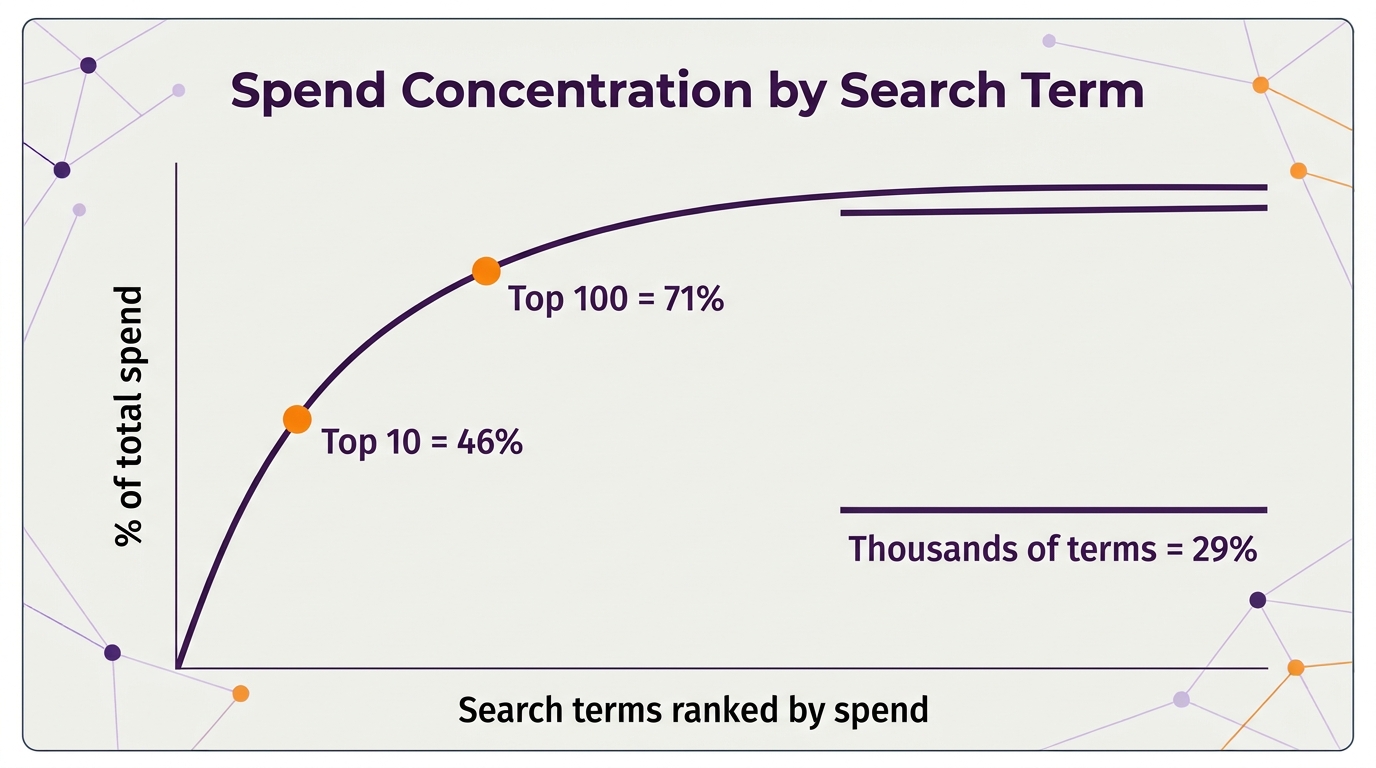
Here is an illustrative picture of spend in a large account. The pattern is common even if your numbers differ:
Search terms
Share of total spend
Top 5
32%
Top 10
46%
Top 100
71%
Everything else (thousands of terms)
29%
Clean up every term outside the top 100 and you have touched under a third of the budget. Make a careless change to the top 10 and you have put almost half of it at risk. The same hour of work has very different effects depending on where you spend it.
IMPORTANT: This is not an argument to ignore the long tail. Wasted long-tail spend adds up, and our guide to where Amazon ad spend gets wasted shows how. It is an argument about order: know where the money goes before you decide what to fix.
How to Measure Spend Concentration
Export the search term report for the last 30 to 60 days from the ads console.
Combine duplicate terms. The same search term can appear in several campaigns. Add their spend, sales, clicks, and orders together.
Sort by spend, highest first.
Add a running total column. In a spreadsheet, divide each row’s cumulative spend by total spend. The row where it crosses 50% tells you how many terms carry half your budget.
Mark the tiers. Tier A is the terms that make up the first half of spend, Tier B the next 30%, and Tier C everything else.
Cumulative share of spend: a few terms carry most of the budget, the long tail carries the rest
Optimize by Tier
Tier
Typical share
How to manage it
A: top terms
About 50% of spend
Review individually, weekly, with small bid steps
B: middle terms
About 30% of spend
Review in batches every week or two
C: long tail
About 20% of spend
Rules: negate or lower bids on clear non-converters
Compare each term’s ACoS with your break-even. Our break-even CPC guide shows how to set that line from your margin.
How to Change Your Biggest Terms Safely
Move bids in small steps. Change a top term by 5% to 10% at a time, then wait several days before the next change.
Check organic rank first. A top term with a high ACoS may be holding a page-one position that drives organic sales. Our Search Query Performance guide shows how to see your share of that search.
Never negate a top term on ACoS alone. Look at TACoS and total sales for the product first. Our post on PPC and organic ranking explains the link.
Change one thing at a time. If you change the bid, placement adjustment, and budget in the same week, you will not know what caused the result.
COMMON MISTAKE: Applying a blanket rule such as “cut every term above 40% ACoS by 30%” to the whole account. On the long tail that is fine. On a term carrying 10% of spend, it can drop sales for the whole product overnight.
How to Handle the Long Tail
Set a clicks threshold. Terms with clicks well above your normal clicks-per-order and zero orders become negative exact matches. Our negative keywords guide covers match types.
Lower bids instead of negating borderline terms. A term that converts at a high ACoS may work at a lower bid.
Harvest winners. Long-tail terms with good orders and low ACoS move into exact match campaigns where you control the bid.
Automate the routine. Bulk sheets, rules, or AI tools connected through the Amazon Ads MCP server can handle Tier C so your time goes to Tier A.
Amazon’s own Sponsored Products best practices recommend using the search term report to find terms that drive sales and adding negative targeting for terms that are not relevant. The tier approach simply decides where that review time goes first.
TIP: Multi-word terms with orders are your best long-tail keywords. Here’s how to structure them.
When This Approach Does Not Fit
Small accounts with a few dozen search terms do not need tiers. Review every term. New launches are also different: spend is spread thin while Amazon learns, so concentration is low by design. Wait until a product has a steady month of data before managing by spend share.
How do I see which search terms take most of my Amazon ad spend?
Export the search term report, combine duplicate terms across campaigns, sort by spend, and add a running percentage of total spend. The point where it crosses 50% shows how many terms carry half your budget.
Should I optimize my biggest search terms or the long tail first?
Look at the biggest terms first because they move results, but change them carefully. Handle the long tail with simple rules so it does not take most of your time.
How much should I change bids on a top search term?
Small steps, around 5% to 10%, then wait several days to see the effect before changing again.
When should I add a search term as a negative keyword?
When it has clearly more clicks than you normally need for an order and still no orders, or when it is irrelevant to your product. Be much more cautious with high-spend terms.
How often should I review my search term report?
Top terms weekly, middle terms every week or two, and long-tail rules monthly. During big events, check top terms more often.
See our Amazon PPC management service and our client results.
Written by the AMZ Scaler Team
Amazon advertising and listing specialists with 5+ years managing PPC and listing optimization for brands across the US, UK, and Canada. We publish what we apply in real seller accounts every day.