
Quick Answer
Manage Amazon PPC by days of supply, not by ACoS alone. When stock will run out before the next shipment lands, cut non-branded and discovery spend first, keep branded and top exact-match keywords running, and slow sales just enough to bridge the gap. Ads stop when a product is out of stock, because only in-stock products can win the featured offer and run (Amazon Ads). After restocking, restart your proven keywords first and ramp bids over one to two weeks. When you’re overstocked, push with ads up to your break-even. From February 1, 2027, the low-inventory-level fee applies only below 28 days of supply (Amazon), so aim to stay just above that line.
Key Takeaways
- Days of supply = units available ÷ average units sold per day. Check it weekly for every advertised ASIN.
- If the next shipment lands after you run out, cut the ad-driven share of sales first. Branded keywords stay on.
- A stockout stops your ads and lets organic rank slip. Bridging the gap is usually cheaper than rebuilding rank afterwards.
- After a restock, restart the keywords that already converted, not the whole account at launch-level bids.
- Overstock is a margin question. Spend up to break-even ACoS to clear it before storage costs climb.
Table of Contents
- Start with days of supply
- Running low: stretch stock without losing rank
- Restarting after a stockout
- Overstocked: when to push harder
- How the 2027 fee changes affect this
- Decision rules
- When not to throttle ads
- FAQ
Start With Days of Supply
Every inventory decision in this guide uses one number: how many days your available stock lasts at your current sales rate. Days of supply = units available ÷ average daily units sold (use the last 14 to 30 days, and remove any deal days that inflate the average). Compare it with your days until restock: the date the next shipment is expected to be received and available, not the date it ships. Inbound shipments often take longer to become sellable than the carrier transit time, and longer again in Q4. Use your own recent receiving times, not the best case.Running Low: Stretch Stock Without Losing Rank
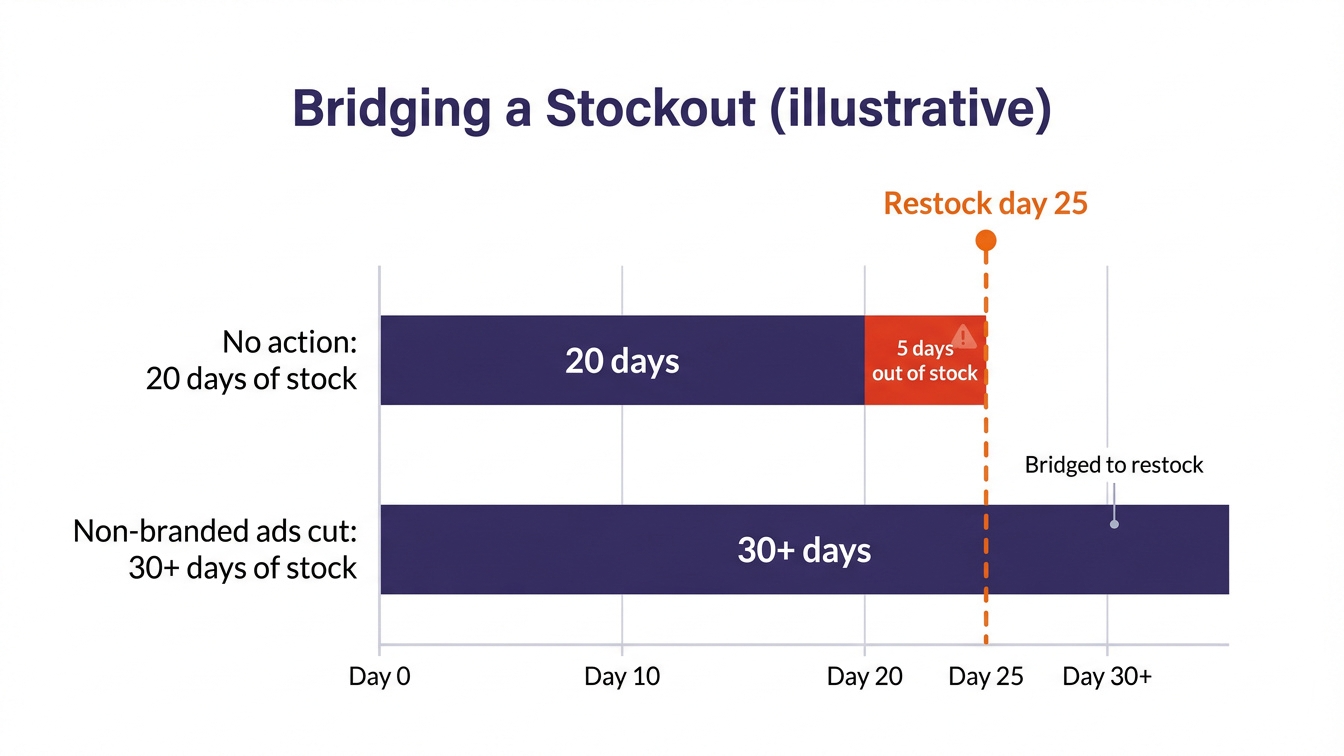
Here is an illustrative product:| Illustrative | Value |
|---|---|
| Units available | 600 |
| Average sales per day | 30 (18 organic and branded, 12 from non-branded ads) |
| Days of supply | 20 |
| Next shipment available in | 25 days |
| Gap without action | 5 days out of stock |
- First: auto campaigns, broad and phrase discovery, category and competitor targeting.
- Second: lower bids or pause the top-of-search placement adjustments on exact-match keywords that aren’t core.
- Keep running: branded keywords and the few exact-match keywords that drive most of your organic rank.
- Optional: a small price increase also slows sales, but watch the featured offer and your price against competitors. Don’t use price as the only lever.
Restarting After a Stockout
When a product runs out, its ads stop serving and it stops collecting sales history. When it’s back, rank and conversion rate often take time to recover. A careful restart costs less than going straight back to full spend:- Confirm the listing is buyable first. Check that the units show as available and that you hold the featured offer again. Ads won’t serve until both are true.
- Restart the proven keywords first. Branded, then the exact-match keywords with the best conversion history. Their data still holds.
- Ramp bids over one to two weeks. Start near your previous bids, not launch-level bids, and raise them in steps on keywords where rank recovers slowly.
- Bring discovery back last. Auto and broad campaigns go back on once the core keywords are converting at their old rate. If rank has fallen a long way on a key term, a short, controlled push like the one in our ranking campaign guide works better than raising every bid.
Overstocked: When to Push Harder
Too much stock is a cost problem, not just a storage note. Every month a slow unit sits in a warehouse, it costs storage, and older stock costs more. The decision is simple: is the extra ad spend to sell a unit now lower than what it costs to keep it, remove it or liquidate it?- Raise the bid ceiling to break-even ACoS, not your profit target, on products you need to clear. Our break-even CPC guide shows the calculation.
- Re-open discovery: broader match types, category targeting and product targeting on complementary items.
- Pair ads with a price signal. A coupon or a deal improves conversion on the extra clicks. See coupons vs Prime Exclusive Discounts vs deals.
- Set a stop rule. If ACoS stays above break-even for two weeks with a discount running, the listing or the price is the problem. Compare the loss per unit with the removal or liquidation cost and pick the cheaper exit.
For stock older than about six months, compare all five exits in our guide to Amazon aged inventory.
How the 2027 Fee Changes Affect This
Two changes announced on November 5, 2026 make stock levels matter more for PPC (Amazon):| Change (from Feb 1, 2027) | What it means for ads |
|---|---|
| Low-inventory-level fee applies only below 28 days of supply | Throttling ads to stretch stock is fine, but running stock down far below 28 days can add a per-unit fee. Plan restocks so you rarely need to |
| Aged inventory surcharge folded into one age-based monthly storage fee | Slow stock costs more the longer it sits. Clearing it earlier with ads up to break-even is often cheaper than waiting |
Decision Rules
| Situation | Do this |
|---|---|
| Days of supply is more than days until restock + 14 | Normal bidding. No inventory action |
| Days of supply is less than days until restock + 14 (thin buffer) | Cut auto, broad and category spend. Keep branded and core exact match |
| Stockout is coming even after cuts | Cut non-core exact match too. Consider a small price rise. Keep branded running to the end |
| Back in stock | Confirm the featured offer, restart branded and core exact match, ramp bids over 1 to 2 weeks, discovery last |
| More than 120 days of supply on a slow mover | Raise bid ceilings to break-even, re-open discovery, add a coupon |
| ACoS above break-even for 2 weeks while clearing | Stop pushing. Compare removal or liquidation cost with the loss per unit and take the cheaper exit |
When Not to Throttle Ads
Don’t cut ads on low stock if the next shipment is already received and being processed, if the product is in a launch or ranking push you can’t afford to stall, or if a short stockout costs less than the margin you would give up. Also check that the “low stock” isn’t a stranded or inbound-problem issue you can fix in Seller Central. If sales stop for another reason, our sudden sales drop checklist helps you rule out inventory first.Related Reading
Frequently Asked Questions
Do Amazon ads stop when you run out of stock?
Yes. Sponsored Products only run on products that are in stock and can win the featured offer. When a product runs out, its ads stop serving until it’s back and buyable.Should I pause PPC when inventory is low?
Not all of it. Cut discovery and non-branded spend first, and keep branded and core exact-match keywords running. That slows sales enough to stretch stock while protecting the rank those keywords hold.How do I restart Amazon PPC after a stockout?
Confirm the units are available and you hold the featured offer, then restart branded and your best exact-match keywords near their previous bids. Ramp up over one to two weeks and bring auto and broad campaigns back last.What is the Amazon low-inventory-level fee in 2027?
From February 1, 2027, Amazon applies the low-inventory-level fee only when a product falls below 28 days of supply, based on shipments in the four weeks before and after the assessment date. Check Amazon’s fee page for the exact rules on your products.How much should I spend on ads to clear overstock?
Up to your break-even ACoS, ideally with a coupon or deal to lift conversion. If you can’t clear it at break-even within a few weeks, compare the loss per unit with removal or liquidation costs.Are Your Ads Running Faster Than Your Stock?
Send us your store or ASIN. We match your campaigns to days of supply, flag the products heading for a stockout or sitting in overstock, and give you a cut, keep and push list.
Get My Free PPC ReviewFree. No obligation. Useful findings even if we don’t work together.
Example result: ACoS cut from 76% to 28% in two months, with ad sales up 47%, for one client account. See the case study. Results vary by category, competition and listing quality.
Written by the AMZ Scaler Team
Amazon advertising and listing specialists with 5+ years managing PPC and listing optimization for brands across the US, UK, and Canada. We publish what we apply in real seller accounts every day.